tools.manual package
manual.face_viewer package
tools.manual.face_viewer.frame Module
The Faces Viewer Frame and Canvas for Faceswap’s Manual Tool.
- class tools.manual.face_viewer.frame.ContextMenu(canvas, detected_faces)
Enables a right click context menu for the
FacesViewer.- Parameters:
canvas (
tkinter.Canvas) – TheFacesViewercanvasdetected_faces (
detected_faces) – The manual tool’s detected faces class
- class tools.manual.face_viewer.frame.FacesActionsFrame(parent: FacesFrame)
The left hand action frame holding the optional annotation buttons.
- Parameters:
parent (
FacesFrame) – The Faces frame that this actions frame reside in
- property key_bindings: dict[str, Literal['mask', 'mesh']]
The mapping of key presses to optional annotations to display. Keyboard shortcuts utilize the function keys.
- Type:
dict
- on_click(display: Literal['mesh', 'mask']) None
Click event for the optional annotation buttons. Loads and unloads the annotations from the faces viewer.
- Parameters:
display (Literal["mesh", "mask"]) – The display name for the button that has called this event as exists in
_buttons- Return type:
None
- class tools.manual.face_viewer.frame.FacesFrame(parent: ttk.Frame, tk_globals: TkGlobals, detected_faces: DetectedFaces, display_frame: DisplayFrame)
The faces display frame (bottom section of GUI). This frame holds the faces viewport and the tkinter objects.
- Parameters:
parent (
ttk.Frame) – The paned window that the faces frame resides intk_globals (
TkGlobals) – The tkinter variables that apply to the whole of the GUIdetected_faces (
DetectedFaces) – TheDetectedFaceobjects for this videodisplay_frame (
DisplayFrame) – The section of the Manual Tool that holds the frames viewer
- canvas_scroll(direction: Literal['up', 'down', 'page-up', 'page-down']) None
Scroll the canvas on an up/down or page-up/page-down key press.
Notes
To protect against a held down key press stacking tasks and locking up the GUI a background thread is launched and discards subsequent key presses whilst the previous update occurs.
- Parameters:
direction (["up", "down", "page-up", "page-down"]) – The request page scroll direction and amount.
- Return type:
None
- set_annotation_display(key: str) None
Set the optional annotation overlay based on keyboard shortcut.
- Parameters:
key (str) – The pressed key
- Return type:
None
- class tools.manual.face_viewer.frame.FacesViewer(parent: ttk.Frame, tk_globals: TkGlobals, tk_action_vars: dict[T.Literal['mesh', 'mask'], tk.BooleanVar], detected_faces: DetectedFaces, display_frame: DisplayFrame, event: Event)
The
tkinter.Canvasthat holds the faces viewer section of the Manual Tool.- Parameters:
parent (
tkinter.ttk.Frame) – The parent frame for the canvastk_globals (
TkGlobals) – The tkinter variables that apply to the whole of the GUItk_action_vars (dict) – The
tkinter.BooleanVarobjects for selectable optional annotations as set by the buttons in theFacesActionsFramedetected_faces (
DetectedFaces) – TheDetectedFaceobjects for this videodisplay_frame (
DisplayFrame) – The section of the Manual Tool that holds the frames viewerevent (
threading.Event) – The threading event object for repeated key press protection
- canvas_scroll(amount: int, units: Literal['pages', 'units'], event: Event) None
Scroll the canvas on an up/down or page-up/page-down key press.
- Parameters:
amount (int) – The number of units to scroll the canvas
units (Literal["pages", "units"]) – The unit type to scroll by
event (
threading.Event) – event to indicate to the calling process whether the scroll is still updating
- Return type:
None
- property control_colors: dict[str, str]
The frame Editor name as key with the current user selected hex code as value.
- Type:
dict[str, str]
- property face_size: int
The currently selected thumbnail size in pixels
- Type:
int
- get_muted_color(color_key: str) str
Creates a muted version of the given annotation color for non-active faces.
- Parameters:
color_key (str) – The annotation key to obtain the color for from
control_colors- Returns:
The hex color code of the muted color
- Return type:
str
- property layout: Grid
The grid for the current
FacesViewer.- Type:
- property optional_annotations: dict[Literal['mesh', 'mask'], bool]
The values currently set for the selectable optional annotations.
- Type:
dict[Literal[“mesh”, “mask”], bool]
- refresh_grid(trigger_var: BooleanVar, retain_position: bool = False) None
Recalculate the full grid and redraw. Used when the active filter pull down is used, a face has been added or removed, or the face thumbnail size has changed.
- Parameters:
trigger_var (
tkinter.BooleanVar) – The tkinter variable that has triggered the grid update. Will either be the variable indicating that the face size have been changed, or the variable indicating that the selected filter mode has been changed.retain_position (bool, optional) –
Trueif the grid should be set back to the position it was at after the update has been processed, otherwiseFalse. Default:False.
- Return type:
None
- property selected_mask: str
The currently selected mask from the display frame control panel.
- Type:
str
- class tools.manual.face_viewer.frame.Grid(canvas: FacesViewer, detected_faces: DetectedFaces)
Holds information on the current filtered grid layout.
The grid keeps information on frame indices, face indices, x and y positions and detected face objects laid out in a numpy array to reflect the current full layout of faces within the face viewer based on the currently selected filter and face thumbnail size.
- Parameters:
canvas (
FacesViewer) – TheFacesViewercanvasdetected_faces (
DetectedFaces) – TheDetectedFaceobjects for this video
- property columns_rows: tuple[int, int]
the (columns, rows) required to hold all display images.
- Type:
tuple
- property dimensions: tuple[int, int]
The (width, height) required to hold all display images.
- Type:
tuple
- property face_size: int
The pixel size of each thumbnail within the face viewer.
- Type:
int
- frame_has_faces(frame_index: int) bool | bool
Check whether the given frame index contains any faces.
- Parameters:
frame_index (int) – The frame index to locate in the grid
- Returns:
Trueif there are faces in the given frame otherwiseFalse- Return type:
bool
- property is_valid: bool
Trueif the current filter means that the grid holds faces.Falseif there are no faces displayed in the grid.- Type:
bool
- transport_index_from_frame(frame_index: int) int | None
Return the main frame’s transport index for the given frame index based on the current filter criteria.
- Parameters:
frame_index (int) – The absolute index for the frame within the full frames list
- Returns:
The index of the requested frame within the filtered frames view. None if no valid frames
- Return type:
int | None
- update() None
Update the underlying grid.
Called on initialization, on a filter change or on add/remove faces. Recalculates the underlying grid for the current filter view and updates the attributes
_grid,_display_faces,_raw_indices,_frames_listandis_valid- Return type:
None
- property visible_area: tuple[ndarray, ndarray]
Tuple containing 2 arrays.
1st array contains an array of shape (4, rows, columns) corresponding to the viewable area of the display grid. 1st dimension contains frame indices, 2nd dimension face indices. The 3rd and 4th dimension contain the x and y position of the top left corner of the face respectively.
2nd array contains
DetectedFaceobjects laid out in (rows, columns)Any locations that are not populated by a face will have a frame and face index of -1
- Type:
tuple[
numpy.ndarray,numpy.ndarray]
- y_coord_from_frame(frame_index: int) int
Return the y coordinate for the first face that appears in the given frame.
- Parameters:
frame_index (int) – The frame index to locate in the grid
- Returns:
The y coordinate of the first face for the given frame
- Return type:
int
Classes
|
Enables a right click context menu for the |
|
The left hand action frame holding the optional annotation buttons. |
|
The faces display frame (bottom section of GUI). |
|
The |
|
Holds information on the current filtered grid layout. |
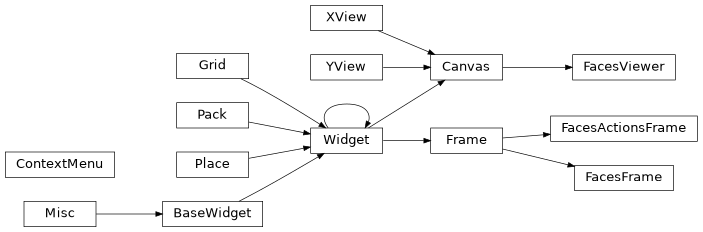
Class Inheritance Diagram
tools.manual.face_viewer.interact Module
Handles the viewport area for mouse hover actions and the active frame
- class tools.manual.face_viewer.interact.ActiveFrame(viewport: Viewport, tk_edited_variable: tk.BooleanVar)
Handles the display of faces and annotations for the currently active frame.
- Parameters:
canvas (
tkinter.Canvas) – TheFacesViewercanvastk_edited_variable (
tkinter.BooleanVar) – The tkinter callback variable indicating that a face has been editedviewport (Viewport)
- property current_frame: ndarray
A BGR version of the frame currently being displayed.
- Type:
numpy.ndarray
- property frame_index: int
The frame index of the currently displayed frame.
- Type:
int
- move_to_top() None
Move the currently selected frame’s faces to the top of the viewport if they are moving off the bottom of the viewer.
- Return type:
None
- reload_annotations() None
Handles the reloading of annotations for the currently active faces.
Highlights the faces within the viewport of those faces that exist in the currently displaying frame. Applies annotations based on the optional annotations and current editor selections.
- Return type:
None
- class tools.manual.face_viewer.interact.Asset(images: list[int], meshes: list[dict[T.Literal['polygon', 'line'], list[int]]], faces: list[DetectedFace], boxes: list[int])
Holds all of the display assets identifiers for the active frame’s face viewer objects
- Parameters:
images (list[int]) – Indices for a frame’s tk image ids displayed in the active frame
meshes (list[dict[Literal["polygon", "line"], list[int]]]) – Indices for a frame’s tk line/polygon object ids displayed in the active frame
faces (list[
DetectedFace]) – DetectedFace objects that exist in the current frameboxes (list[int]) – Indices for a frame’s bounding box object ids displayed in the active frame
- boxes: list[int] = <dataclasses._MISSING_TYPE object>
Indices for a frame’s bounding box object ids displayed in the active frame
- Type:
list[int]
- faces: list[DetectedFace] = <dataclasses._MISSING_TYPE object>
DetectedFace objects that exist in the current frame
- Type:
list[
DetectedFace]
- images: list[int] = <dataclasses._MISSING_TYPE object>
Indices for a frame’s tk image ids displayed in the active frame
- Type:
list[int]
- meshes: list[dict[T.Literal['polygon', 'line'], list[int]]] = <dataclasses._MISSING_TYPE object>
Indices for a frame’s tk line/polygon object ids displayed in the active frame
- Type:
list[dict[Literal[“polygon”, “line”], list[int]]]
- class tools.manual.face_viewer.interact.HoverBox(viewport: Viewport)
Handle the current mouse location when over the
Viewport.Highlights the face currently underneath the cursor and handles actions when clicking on a face.
- Parameters:
viewport (
Viewport) – The viewport object for theFacesViewercanvas
- on_hover(event: Event | None) None
Highlight the face and set the mouse cursor for the mouse’s current location.
- Parameters:
event (
tkinter.EventorNone) – The tkinter mouse event. Provides the current location of the mouse cursor. IfNoneis passed as the event (for example when this function is being called outside of a mouse event) then the location of the cursor will be calculated- Return type:
None
Classes
|
Handles the display of faces and annotations for the currently active frame. |
|
Holds all of the display assets identifiers for the active frame's face viewer objects |
|
Handle the current mouse location when over the |
tools.manual.face_viewer.viewport Module
Handles the visible area of the FacesViewer canvas.
- class tools.manual.face_viewer.viewport.Recycler(canvas: FacesViewer)
Tkinter can slow down when constantly creating new objects.
This class delivers recycled objects, if stale objects are available, otherwise creates a new object
:param
FacesViewer: The canvas that holds the faces display- Parameters:
canvas (FacesViewer)
- get_image(coordinates: tuple[float | int, float | int]) int
Obtain a recycled or new image object ID
- Parameters:
coordinates (tuple[float | int, float | int]) – The co-ordinates that the image should be displayed at
- Returns:
The canvas object id for the created image
- Return type:
int
- get_mesh(face: DetectedFace) dict[T.Literal['polygon', 'line'], list[int]]
Get the mesh annotation for the landmarks. This is made up of a series of polygons or lines, depending on which part of the face is being annotated. Creates a new series of objects, or pulls existing objects from the recycled objects pool if they are available.
- Parameters:
face (
DetectedFace) – The detected face object to obrain the mesh for- Returns:
The dictionary of line and polygon tkinter canvas object ids for the mesh annotation
- Return type:
dict[Literal[“polygon”, “line”], list[int]]
- recycle_assets(asset_ids: list[int]) None
Recycle assets that are no longer required
- Parameters:
asset_ids (list[int]) – The IDs of the assets to be recycled
- Return type:
None
- class tools.manual.face_viewer.viewport.TKFace(face: ndarray, size: int = 128, mask: ndarray | None = None)
An object that holds a single
tkinter.PhotoImageface, ready for placement in theViewport, Handles the placement of and removal of masks for the face as well as updates on any edits.- Parameters:
face (
numpy.ndarray) – The face, sized correctly as a 3 channel BGR image or an encoded jpg to create atkinter.PhotoImagefromsize (int, optional) – The pixel size of the face image. Default: 128
mask (
numpy.ndarrayorNone, optional) – The mask to be applied to the face image. PassNoneif no mask is to be used. DefaultNone
- property photo: PhotoImage
The face in a format that can be placed on the
FacesViewercanvas.- Type:
PIL.ImageTk.PhotoImage
- update(face: ndarray, mask: ndarray) None
Update the
photowith the given face and mask.- Parameters:
face (
numpy.ndarray) – The face, sized correctly as a 3 channel BGR imagemask (
numpy.ndarrayorNone) – The mask to be applied to the face image. PassNoneif no mask is to be used
- Return type:
None
- class tools.manual.face_viewer.viewport.Viewport(canvas: FacesViewer, tk_edited_variable: tk.BooleanVar)
Handles the display of faces and annotations in the currently viewable area of the canvas.
- Parameters:
canvas (
tkinter.Canvas) – TheFacesViewercanvastk_edited_variable (
tkinter.BooleanVar) – The variable that indicates that a face has been edited
- face_from_point(point_x: int, point_y: int) ndarray
Given an (x, y) point on the
Viewport, obtain the face information at that location.- Parameters:
point_x (int) – The x position on the canvas of the point to retrieve the face for
point_y (int) – The y position on the canvas of the point to retrieve the face for
- Returns:
Array of shape (4, ) containing the (frame index, face index, x_point of top left corner, y point of top left corner) of the face at the given coordinates.
If the given coordinates are not over a face, then the frame and face indices will be -1
- Return type:
numpy.ndarray
- property face_size: int
The pixel size of each thumbnail
- Type:
int
- get_landmarks(frame_index: int, face_index: int, face: DetectedFace, top_left: list[float], refresh: bool = False) dict[T.Literal['polygon', 'line'], list[np.ndarray]]
Obtain the landmark points for each mesh annotation.
First tries to obtain the aligned landmarks from the cache. If the landmarks do not exist in the cache, or a refresh has been requested, then the landmarks are calculated from the detected face object.
- Parameters:
frame_index (int) – The frame index to obtain the face for
face_index (int) – The face index of the face within the requested frame
face (
lib.align.DetectedFace) – The detected face object to obtain landmarks fortop_left (list[float]) – The top left (x, y) points of the face’s bounding box within the viewport
refresh (bool, optional) – Whether to force a reload of the face’s aligned landmarks, even if they already exist within the cache. Default:
False
- Returns:
The key is the tkinter canvas object type for each part of the mesh annotation (polygon, line). The value is a list containing the (x, y) coordinates of each part of the mesh annotation, from the top left corner location.
- Return type:
dict
- get_tk_face(frame_index: int, face_index: int, face: DetectedFace) TKFace
Obtain the
TKFaceobject for the given face from the cache. If the face does not exist in the cache, then it is generated and added prior to returning.- Parameters:
frame_index (int) – The frame index to obtain the face for
face_index (int) – The face index of the face within the requested frame
face (
DetectedFace) – The detected face object, containing the thumbnail jpg
- Returns:
An object for displaying in the faces viewer canvas populated with the aligned mesh landmarks and face thumbnail
- Return type:
- property mesh_kwargs: dict[Literal['polygon', 'line'], dict[str, Any]]
Dynamic keyword arguments defining the color and state for the objects that make up a single face’s mesh annotation based on the current user selected options. Values are the keyword arguments for that given type.
- Type:
dict[Literal[“polygon”, “line”], str | int]
- move_active_to_top() None
Check whether the active frame is going off the bottom of the viewport, if so: move it to the top of the viewport.
- Return type:
None
- reset() None
Reset all the cached objects on a face size change.
- Return type:
None
- property selected_editor: str
The currently selected editor.
- Type:
str
- toggle_mask(state: Literal['hidden', 'normal'], mask_type: str) None
Toggles the mask optional annotation on and off.
- Parameters:
state (Literal["hidden", "normal"]) – Whether the mask should be displayed or hidden
mask_type (str) – The type of mask to overlay onto the face
- Return type:
None
- toggle_mesh(state: Literal['hidden', 'normal']) None
Toggles the mesh optional annotations on and off.
- Parameters:
state (Literal["hidden", "normal"]) – The state to set the mesh annotations to
- Return type:
None
- update(refresh_annotations: bool = False) None
Update the viewport.
- Parameters:
refresh_annotations (bool, optional) –
Trueif mesh annotations should be re-calculated otherwiseFalse. Default:Falsecanvas (Obtains the objects that are currently visible. Updates the visible area of the)
annotations. (and reloads the active frame's)
- Return type:
None
- class tools.manual.face_viewer.viewport.VisibleObjects(viewport: Viewport)
Holds the objects from the
Gridthat appear in the viewable area of theViewport.- Parameters:
viewport (
Viewport) – The viewport object for theFacesViewercanvas
- property images: ndarray
The viewport’s tkinter canvas image objects.
A numpy array of shape (rows, columns) corresponding to the viewable area of the display grid and containing the tkinter canvas image object for the face at the corresponding location.
- Type:
numpy.ndarray
- property meshes: ndarray
The viewport’s tkinter canvas mesh annotation objects.
A numpy array of shape (rows, columns) corresponding to the viewable area of the display grid and containing a dictionary of the corresponding tkinter polygon and line objects required to build a face’s mesh annotation for the face at the corresponding location.
- Type:
numpy.ndarray
- update() None
Load and unload thumbnails in the visible area of the faces viewer.
- Return type:
None
- property visible_faces: ndarray
The currently visible
DetectedFaceobjects.A numpy array of shape (rows, columns) corresponding to the viewable area of the display grid and containing the detected faces at their currently viewable position.
Any locations that are not populated by a face will have
Nonein it’s place.- Type:
numpy.ndarray
- property visible_grid: ndarray
The currently visible section of the
GridA numpy array of shape (4, rows, columns) corresponding to the viewable area of the display grid. 1st dimension contains frame indices, 2nd dimension face indices. The 3rd and 4th dimension contain the x and y position of the top left corner of the face respectively.
Any locations that are not populated by a face will have a frame and face index of -1.
- Type:
numpy.ndarray
Classes
|
Tkinter can slow down when constantly creating new objects. |
|
An object that holds a single |
|
Handles the display of faces and annotations in the currently viewable area of the canvas. |
|
Holds the objects from the |
manual.frame_viewer package
tools.manual.frame_viewer.control Module
Handles Navigation and Background Image for the Frame Viewer section of the manual tool GUI.
- class tools.manual.frame_viewer.control.BackgroundImage(canvas)
The background image of the canvas
- refresh(view_mode)
Update the displayed frame.
- Parameters:
view_mode (["frame", "face"]) – The currently active editor’s selected view mode.
Handles playback and frame navigation for the Frame Viewer Window.
- Parameters:
display_frame (
DisplayFrame) – The parent frame viewer window
Update The frame navigation position to the previous frame based on filter.
Go to the first frame that meets the filter criteria.
Go to the last frame that meets the filter criteria.
Handle the play button.
Switches the
tk_is_playingvariable.
Update The frame navigation position to the next frame based on filter.
Adjust transport slider scale for different filters. Hide or display optional filter controls.
Stop play back if playing
Whether the stream is currently playing.
- Type:
tkinter.BooleanVar
Classes
|
The background image of the canvas |
|
Handles playback and frame navigation for the Frame Viewer Window. |
tools.manual.frame_viewer.frame Module
The frame viewer section of the manual tool GUI
- class tools.manual.frame_viewer.frame.ActionsFrame(parent)
The left hand action frame holding the action buttons.
- Parameters:
parent (
DisplayFrame) – The Display frame that the Actions reside in
- property actions
The available action names as a tuple of strings.
- Type:
tuple
- add_optional_buttons(editors)
Add the optional editor specific action buttons
- property key_bindings
action}. The mapping of key presses to actions. Keyboard shortcut is the first letter of each action.
- Type:
dict
- Type:
{key
- on_click(action)
Click event for all of the main buttons.
- Parameters:
action (str) – The action name for the button that has called this event as exists in
_buttons
- property tk_selected_action
The variable holding the currently selected action
- Type:
tkinter.StringVar
- class tools.manual.frame_viewer.frame.DisplayFrame(parent, tk_globals, detected_faces)
The main video display frame (top left section of GUI).
- Parameters:
parent (
ttk.PanedWindow) – The paned window that the display frame resides intk_globals (
TkGlobals) – The tkinter variables that apply to the whole of the GUIdetected_faces (
tools.manual.detected_faces.DetectedFaces) – The detected faces stored in the alignments file
- property active_editor
The current editor in use based on
selected_action.- Type:
Editor
- cycle_filter_mode()
Cycle the navigation mode combo entry
- property editors
All of the
Editorthat the canvas holds- Type:
dict
Class that handles frame Navigation and transport.
- Type:
Navigation
- pack_threshold_slider()
Display or hide the threshold slider depending on the current filter mode. For misaligned faces filter, display the slider. Hide for all other filters.
- set_action(key)
Set the current action based on keyboard shortcut
- Parameters:
key (str) – The pressed key
- property tk_control_colors
Editor key with
tkinter.StringVarcontaining the selected color hex code for each annotation- Type:
dict
- property tk_selected_action
The variable holding the currently selected action
- Type:
tkinter.StringVar
- property tk_selected_mask
Editor key with
tkinter.StringVarcontaining the selected color hex code for each annotation- Type:
dict
- class tools.manual.frame_viewer.frame.FrameViewer(parent, tk_globals, detected_faces, actions, tk_action_var)
Annotation onto tkInter Canvas.
- Parameters:
parent (
tkinter.ttk.Frame) – The parent frame for the canvastk_globals (
TkGlobals) – The tkinter variables that apply to the whole of the GUIdetected_faces (
AlignmentsData) – The alignments data for this manual sessionactions (tuple) – The available actions from
ActionFrame.actionstk_action_var (
tkinter.StringVar) – The variable holding the currently selected action
- property active_editor
The current editor in use based on
selected_action.- Type:
Editor
- property annotation_formats
The selected formatting options for each annotation
- Type:
dict
- property control_tk_vars
dictionary of tkinter variables as populated by the right hand control panel. Tracking for all control panel variables, for access from all editors.
- Type:
dict
- property editor_display
List of editors and any additional annotations they should display.
- Type:
dict
- property editors
All of the
Editorobjects that exist- Type:
dict
- property key_bindings
dictionary of key bindings for each editor for access from all editors.
- Type:
dict
- property offset
The (width, height) offset of the canvas based on the size of the currently displayed image
- Type:
tuple
- property selected_action
The name of the currently selected Editor action
- Type:
str
Classes
|
The left hand action frame holding the action buttons. |
|
The main video display frame (top left section of GUI). |
|
Annotation onto tkInter Canvas. |
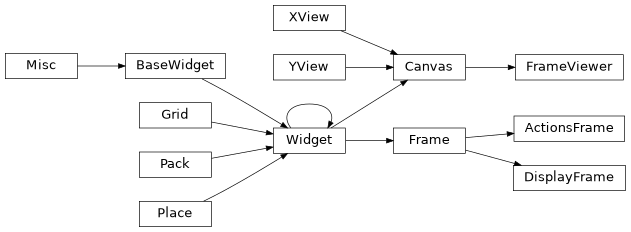
Class Inheritance Diagram
tools.manual.frame_viewer.editor.bounding_box Module
Bounding Box Editor for the manual adjustments tool
- class tools.manual.frame_viewer.editor.bounding_box.BoundingBox(canvas, detected_faces)
The Bounding Box Editor.
Adjusting the bounding box feeds the aligner to generate new 68 point landmarks.
- Parameters:
canvas (
tkinter.Canvas) – The canvas that holds the image and annotationsdetected_faces (
DetectedFaces) – The _detected_faces data for this manual session
- set_mouse_click_actions()
Add context menu to OS specific right click action.
- update_annotation()
Get the latest bounding box data from alignments and update.
Classes
|
The Bounding Box Editor. |
Class Inheritance Diagram

tools.manual.frame_viewer.editor.extract_box Module
Extract Box Editor for the manual adjustments tool
- class tools.manual.frame_viewer.editor.extract_box.ExtractBox(canvas, detected_faces)
The Extract Box Editor.
Adjust the calculated Extract Box to shift all of the 68 point landmarks in place.
- Parameters:
canvas (
tkinter.Canvas) – The canvas that holds the image and annotationsdetected_faces (
DetectedFaces) – The _detected_faces data for this manual session
- set_mouse_click_actions()
Add context menu to OS specific right click action.
- update_annotation()
Draw the latest Extract Boxes around the faces.
Classes
|
The Extract Box Editor. |
Class Inheritance Diagram

tools.manual.frame_viewer.editor.landmarks Module
Landmarks Editor and Landmarks Mesh viewer for the manual adjustments tool
- class tools.manual.frame_viewer.editor.landmarks.Landmarks(canvas, detected_faces)
The Landmarks Editor.
Adjust individual landmark points and re-generate Extract Box.
- Parameters:
canvas (
tkinter.Canvas) – The canvas that holds the image and annotationsdetected_faces (
DetectedFaces) – The _detected_faces data for this manual session
- update_annotation()
Get the latest Landmarks points and update.
- class tools.manual.frame_viewer.editor.landmarks.Mesh(canvas, detected_faces)
The Landmarks Mesh Display.
There are no editing options for Mesh editor. It is purely aesthetic and updated when other editors are used.
- Parameters:
canvas (
tkinter.Canvas) – The canvas that holds the image and annotationsdetected_faces (
DetectedFaces) – The _detected_faces data for this manual session
- update_annotation()
Get the latest Landmarks and update the mesh.
Classes
|
The Landmarks Editor. |
|
The Landmarks Mesh Display. |
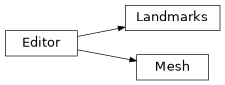
Class Inheritance Diagram
tools.manual.frame_viewer.editor.mask Module
Mask Editor for the manual adjustments tool
- class tools.manual.frame_viewer.editor.mask.Mask(canvas: tk.Canvas, detected_faces: detected_faces.DetectedFaces)
The mask Editor.
Edit a mask in the alignments file.
- Parameters:
canvas (tk.Canvas) – The canvas that holds the image and annotations
detected_faces (detected_faces.DetectedFaces) – The _detected_faces data for this manual session
- hide_annotation(tag=None) None
Clear the mask
_metadict when hiding the annotation.- Return type:
None
- update_annotation() None
Update the mask annotation with the latest mask.
- Return type:
None
Classes
|
The mask Editor. |
Class Inheritance Diagram

manual package
tools.manual.cli Module
The Command Line Arguments for the Manual Editor tool.
- class tools.manual.cli.ManualArgs(subparser: _SubParsersAction | None, command: str, description: str = 'default')
Generate the command line options for the Manual Editor Tool.
- Parameters:
subparser (_SubParsersAction | None)
command (str)
description (str)
- static get_argument_list()
Generate the command line argument list for the Manual Tool.
- static get_info()
Obtain the information about what the Manual Tool does.
Classes
|
Generate the command line options for the Manual Editor Tool. |
Class Inheritance Diagram

tools.manual.detected_faces Module
Alignments handling for Faceswap’s Manual Adjustments tool. Handles the conversion of
alignments data to DetectedFace objects, and the update of these faces
when edits are made in the GUI.
- class tools.manual.detected_faces.DetectedFaces(tk_globals: manual.TkGlobals, alignments_path: str, input_location: str, extractor: manual.Aligner)
Handles the manipulation of
DetectedFaceobjects stored in the alignments file. Acts as a parent class for the IO operations (saving and loading from an alignments file), the face update operations (when changes are made to alignments in the GUI) and the face filters (when a user changes the filter navigation mode.)- Parameters:
tk_globals (manual.TkGlobals) – The tkinter variables that apply to the whole of the GUI
alignments_path (str) – The full path to the alignments file
input_location (str) – The location of the input folder of frames or video file
extractor (manual.Aligner) – The pipeline for passing faces through the aligner and retrieving results
- property available_masks: dict[str, int]
The mask type names stored in the alignments; type as key with the number of faces which possess the mask type as value.
- property current_faces: list[list[DetectedFace]]
The most up to date full list of detected face objects.
- extract() None
Extract the faces in the current video to a user supplied folder.
- Return type:
None
- property extractor: manual.Aligner
The pipeline for passing faces through the aligner and retrieving results.
- property face_count_per_index: list[int]
Count of faces for each frame. List is in frame index order.
The list needs to be calculated on the fly as the number of faces in a frame can change based on user actions.
- property filter: Filter
Handles returning of faces and stats based on the current user set navigation mode filter.
- property frame_list: list[str]
The list of all frame names that appear in the alignments file
- is_frame_updated(frame_index: int) bool
Check whether the given frame index has been updated
- Parameters:
frame_index (int) – The frame index to check
- Return type:
Trueif the given frame index has updated faces within it otherwiseFalse
- load_faces() None
Load the faces as
DetectedFaceobjects from the alignments file.- Return type:
None
- revert_to_saved(frame_index)
Revert the frame’s alignments to their saved version for the given frame index.
- Parameters:
frame_index – The frame that should have their faces reverted to their saved version
- save() None
Save the alignments file with the latest edits.
- Return type:
None
- save_video_meta_data(pts_time: list[int], keyframes: list[int]) None
Save video meta data to the alignments file. This is executed if the video meta data does not already exist in the alignments file, so the video does not need to be scanned on every use of the Manual Tool.
- Parameters:
pts_time (list[int]) – A list of presentation timestamps in frame index order for every frame in the input video
keyframes (list[int]) – A list of frame indices corresponding to the key frames in the input video.
- Return type:
None
- property tk_edited: BooleanVar
The variable indicating whether an edit has occurred meaning a GUI redraw needs to be triggered.
- property tk_face_count_changed: BooleanVar
The variable indicating whether a face has been added or removed meaning the
FaceViewergrid redraw needs to be triggered.
- property tk_unsaved: BooleanVar
The variable indicating whether the alignments have been updated since the last save.
- property update: FaceUpdate
Handles the adding, removing and updating of
DetectedFacestored within the alignments file.
- property video_meta_data: dict[Literal['pts_time', 'keyframes'], list[int]] | None
The frame meta data stored in the alignments file. If data does not exist in the alignments file then
Noneis returned for each Key
- class tools.manual.detected_faces.FaceUpdate(detected_faces: DetectedFaces)
Perform updates on
DetectedFaceobjects stored inDetectedFaceswhen changes are made within the GUI.- Parameters:
detected_faces (DetectedFaces) – The parent
DetectedFacesobject
- add(frame_index: int, pnt_x: int, width: int, pnt_y: int, height: int) None
Add a
DetectedFaceobject to the current frame with the given dimensions.- Parameters:
frame_index (int) – The frame that the face is being set for
pnt_x (int) – The left point of the bounding box
width (int) – The width of the bounding box
pnt_y (int) – The top point of the bounding box
height (int) – The height of the bounding box
- Return type:
None
- bounding_box(frame_index: int, face_index: int, pnt_x: int, width: int, pnt_y: int, height: int, aligner: Literal['FAN', 'HRNet', 'cv2-dnn'] = 'HRNet') None
Update the bounding box for the
DetectedFaceobject at the given frame and face indices, with the given dimensions and update the 68 point landmarks from theAlignerfor the updated bounding box.- Parameters:
frame_index (int) – The frame that the face is being set for
face_index (int) – The face index within the frame
pnt_x (int) – The left point of the bounding box
width (int) – The width of the bounding box
pnt_y (int) – The top point of the bounding box
height (int) – The height of the bounding box
aligner (Literal['FAN', 'HRNet', 'cv2-dnn']) – The aligner to use to generate the landmarks. Default: “HRNet”
- Return type:
None
- copy(frame_index: int, direction: Literal['prev', 'next']) None
Copy the alignments from the previous or next frame that has alignments to the current frame.
- Parameters:
frame_index (int) – The frame that the needs to have alignments copied to it
direction (Literal['prev', 'next']) – Whether to copy alignments from the previous frame with alignments, or the next frame with alignments
- Return type:
None
- delete(frame_index: int, face_index: int) None
Delete the
DetectedFaceobject for the given frame and face indices.- Parameters:
frame_index (int) – The frame that the face is being set for
face_index (int) – The face index within the frame
- Return type:
None
- landmark(frame_index: int, face_index: int, landmark_index: int, shift_x: int, shift_y: int, is_zoomed: bool) None
Shift a single landmark point for the
DetectedFaceobject at the given frame and face indices by the given x and y values.- Parameters:
frame_index (int) – The frame that the face is being set for
face_index (int) – The face index within the frame
landmark_index (int) – The landmark index to shift. If a list is provided, this should be a list of landmark indices to be shifted
shift_x (int) – The amount to shift the landmark by along the x axis
shift_y (int) – The amount to shift the landmark by along the y axis
is_zoomed (bool) –
Trueif landmarks are being adjusted on a zoomed image otherwiseFalse
- Return type:
None
- landmarks(frame_index: int, face_index: int, shift_x: int, shift_y: int) None
Shift all of the landmarks and bounding box for the
DetectedFaceobject at the given frame and face indices by the given x and y values and update the masks.- Parameters:
frame_index (int) – The frame that the face is being set for
face_index (int) – The face index within the frame
shift_x (int) – The amount to shift the landmarks by along the x axis
shift_y (int) – The amount to shift the landmarks by along the y axis
- Return type:
None
Notes
Whilst the bounding box does not need to be shifted, it is anyway, to ensure that it is aligned with the newly adjusted landmarks.
- landmarks_rotate(frame_index: int, face_index: int, angle: float, center: ndarray) None
Rotate the landmarks on an Extract Box rotate for the
DetectedFaceobject at the given frame and face indices for the given angle from the given center point.- Parameters:
frame_index (int) – The frame that the face is being set for
face_index (int) – The face index within the frame
angle (float) – The angle, in radians to rotate the points by
center (ndarray) – The center point of the Landmark’s Extract Box
- Return type:
None
- landmarks_scale(frame_index: int, face_index: int, scale: ndarray, center: ndarray) None
Scale the landmarks on an Extract Box resize for the
DetectedFaceobject at the given frame and face indices from the given center point.- Parameters:
frame_index (int) – The frame that the face is being set for
face_index (int) – The face index within the frame
scale (ndarray) – The amount to scale the landmarks by
center (ndarray) – The center point of the Landmark’s Extract Box
- Return type:
None
- mask(frame_index: int, face_index: int, mask: ndarray, mask_type: str) None
Update the mask on an edit for the
DetectedFaceobject at the given frame and face indices, for the given mask and mask type.- Parameters:
frame_index (int) – The frame that the face is being set for
face_index (int) – The face index within the frame
mask (ndarray) – The mask to replace
mask_type (str) – The name of the mask that is to be replaced
- Return type:
None
- post_edit_trigger(frame_index: int, face_index: int) None
Update the jpg thumbnail, the viewport thumbnail, the landmark masks and the aligned face on a face edit.
- Parameters:
frame_index (int) – The frame that the face is being set for
face_index (int) – The face index within the frame
- Return type:
None
- class tools.manual.detected_faces.Filter(detected_faces: DetectedFaces)
Returns stats and frames for filtered frames based on the user selected navigation mode filter.
- Parameters:
detected_faces (DetectedFaces) – The parent
DetectedFacesobject
- property count: int
The number of frames that meet the filter criteria returned by
get().
- property frame_meets_criteria: bool
Trueif the current frame meets the selected filter criteria otherwiseFalse.
- property frames_list: list[int]
The list of frame indices that meet the filter criteria returned by
get().
- property raw_indices: dict[Literal['frame', 'face'], list[int]]
The frame and face indices that meet the current filter criteria for each displayed face.
Classes
|
Handles the manipulation of |
|
Perform updates on |
|
Returns stats and frames for filtered frames based on the user selected navigation mode filter. |
tools.manual.globals Module
Holds global tkinter variables and information pertaining to the entire Manual tool
- class tools.manual.globals.CurrentFrame(image: ndarray = <factory>, scale: float = 1.0, interpolation: int = 3, display_dims: tuple[int, int]=(0, 0), filename: str = '')
Dataclass for holding information about the currently displayed frame
- Parameters:
image (ndarray)
scale (float)
interpolation (int)
display_dims (tuple[int, int])
filename (str)
- display_dims: tuple[int, int] = (0, 0)
The size of the currently displayed frame, in the display window
- Type:
tuple[int, int]`
- filename: str = ''
The filename of the currently displayed frame
- Type:
str
- image: ndarray = <dataclasses._MISSING_TYPE object>
The currently displayed frame in original dimensions
- Type:
numpy.ndarry
- interpolation: int = 3
The opencv interpolator ID to use for resizing the image to the display window
- Type:
int
- scale: float = 1.0
The scaling factor to use to resize the image to the display window
- Type:
float
- class tools.manual.globals.TKVars(frame_index: IntVar, transport_index: IntVar, face_index: IntVar, filter_distance: IntVar, update: BooleanVar, update_active_viewport: BooleanVar, is_zoomed: BooleanVar, filter_mode: StringVar, faces_size: StringVar)
Holds the global TK Variables
- Parameters:
frame_index (IntVar)
transport_index (IntVar)
face_index (IntVar)
filter_distance (IntVar)
update (BooleanVar)
update_active_viewport (BooleanVar)
is_zoomed (BooleanVar)
filter_mode (StringVar)
faces_size (StringVar)
- face_index: IntVar = <dataclasses._MISSING_TYPE object>
The face index of the currently selected face
- Type:
tkinter.IntVar
- faces_size: StringVar = <dataclasses._MISSING_TYPE object>
The pixel size of faces in the viewport
- Type:
tkinter.StringVar
- filter_distance: IntVar = <dataclasses._MISSING_TYPE object>
The amount to filter by distance
- Type:
tkinter.IntVar
- filter_mode: StringVar = <dataclasses._MISSING_TYPE object>
The currently selected filter mode
- Type:
tkinter.StringVar
- frame_index: IntVar = <dataclasses._MISSING_TYPE object>
The absolute frame index of the currently displayed frame
- Type:
tkinter.IntVar
- is_zoomed: BooleanVar = <dataclasses._MISSING_TYPE object>
Whether the main window is zoomed in to a face or out to a full frame
- Type:
tkinter.BooleanVar
- transport_index: IntVar = <dataclasses._MISSING_TYPE object>
The transport index of the currently displayed frame when filters have been applied
- Type:
tkinter.IntVar
- update: BooleanVar = <dataclasses._MISSING_TYPE object>
Whether an update has been performed
- Type:
tkinter.BooleanVar
- update_active_viewport: BooleanVar = <dataclasses._MISSING_TYPE object>
Whether the viewport needs updating
- Type:
tkinter.BooleanVar
- class tools.manual.globals.TkGlobals(input_location: str)
Holds Tkinter Variables and other frame information that need to be accessible from all areas of the GUI.
- Parameters:
input_location (str) – The location of the input folder of frames or video file
- property current_frame: CurrentFrame
The currently displayed frame in the frame viewer with it’s meta information.
- Type:
- property face_index: int
The currently displayed face index when in zoomed mode.
- Type:
int
- property frame_count: int
The total number of frames for the input location
- Type:
int
- property frame_display_dims: tuple[int, int]
The (width, height) of the video display frame in pixels.
- Type:
tuple
- property frame_index: int
The currently displayed frame index. NB This returns -1 if there are no frames that meet the currently selected filter criteria.
- Type:
int
- property is_video: bool
Trueif the input is a video file,Falseif it is a folder of images.- Type:
bool
- property is_zoomed: bool
Trueif the frame viewer is zoomed into a face,Falseif the frame viewer is displaying a full frame.- Type:
bool
- set_current_frame(image: ndarray, filename: str) None
Set the frame and meta information for the currently displayed frame. Populates the attribute
current_frame- Parameters:
image (
numpy.ndarray) – The image used to display in the Frame Viewerfilename (str) – The filename of the current frame
- Return type:
None
- set_face_index(index: int) None
Set the currently selected face index
- Parameters:
index (int) – The currently selected face index
- Return type:
None
- set_frame_count(count: int) None
Set the count of total number of frames to
frame_countwhen theFramesLoaderhas completed loading.- Parameters:
count (int) – The number of frames that exist for this session
- Return type:
None
- set_frame_display_dims(width: int, height: int) None
Set the size, in pixels, of the video frame display window and resize the displayed frame.
Used on a frame resize callback, sets the :attr:frame_display_dims`.
- Parameters:
width (int) – The width of the frame holding the video canvas in pixels
height (int) – The height of the frame holding the video canvas in pixels
- Return type:
None
- set_zoomed(state: bool) None
Set the current zoom state
- Parameters:
state (bool) –
Truefor zoomedFalsefor full frame- Return type:
None
- property var_faces_size: StringVar
The variable holding the currently selected Faces Viewer thumbnail size.
- Type:
tkinter..IntVar
- property var_filter_distance: IntVar
The variable holding the currently selected threshold distance for misaligned filter mode.
- Type:
tkinter.IntVar
- property var_filter_mode: StringVar
The variable holding the currently selected navigation filter mode.
- Type:
tkinter.StringVar
- property var_frame_index: IntVar
The current absolute frame index of the currently displayed frame.
- Type:
tkinter.IntVar
- property var_full_update: BooleanVar
Flag to indicate that whole GUI should be refreshed
- Type:
tkinter.BooleanVar
- property var_transport_index: IntVar
The current index of the display frame’s transport slider.
- Type:
tkinter.IntVar
- property var_update_active_viewport: BooleanVar
Boolean Variable that is traced by the viewport’s active frame to update.
- Type:
tkinter.BooleanVar
Classes
|
Dataclass for holding information about the currently displayed frame |
|
Holds the global TK Variables |
|
Holds Tkinter Variables and other frame information that need to be accessible from all areas of the GUI. |
tools.manual.manual Module
Main entry point for the Manual Tool. A GUI app for editing alignments files
- class tools.manual.manual.Aligner(tk_globals: TkGlobals)
The
Alignerclass sets up an extraction pipeline for each of the current Faceswap Aligners, along with the Landmarks based Maskers. When new landmarks are required, the bounding boxes from the GUI are passed to this class for pushing through the pipeline. The resulting Landmarks and Masks are then returned.- Parameters:
tk_globals (TkGlobals) – The tkinter variables that apply to the whole of the GUI
- get_landmarks(frame_index: int, face_index: int, aligner: Literal['FAN', 'HRNet', 'cv2-dnn']) ndarray
Feed the detected face into the alignment pipeline and retrieve the landmarks.
The face to feed into the aligner is generated from the given frame and face indices.
- Parameters:
frame_index (int) – The frame index to extract the aligned face for
face_index (int) – The face index within the current frame to extract the face for
aligner (Literal['FAN', 'HRNet', 'cv2-dnn']) – The aligner to use to extract the face
- Return type:
The 68 point landmark alignments
- property is_initialized: bool
The Aligners are initialized in a background thread so that other tasks can be performed whilst we wait for initialization.
Trueis returned if the aligner has completed initialization otherwiseFalse.
- link_faces(detected_faces: DetectedFaces) None
As the Aligner has the potential to take the longest to initialize, it is kicked off as early as possible. At this time
DetectedFacesis not yet available.Once the Aligner has initialized, this function is called to add the
DetectedFacesclass as a property of the Aligner.- Parameters:
detected_faces (DetectedFaces) – The class that holds the
DetectedFaceobjects for the current Manual session- Return type:
None
- set_normalization_method(method: Literal['none', 'clahe', 'hist', 'mean']) None
Change the normalization method for faces fed into the aligner. The normalization method is user adjustable from the GUI. When this method is triggered the method is updated for all aligner pipelines.
- Parameters:
method (Literal['none', 'clahe', 'hist', 'mean']) – The normalization method to use
- Return type:
None
- class tools.manual.manual.FrameLoader(tk_globals: TkGlobals, frames_location: str, video_meta_data: dict[Literal['pts_time', 'keyframes'], list[int]] | None, file_list: list[str])
Loads the frames, sets the frame count to
TkGlobals.frame_countand handles the return of the correct frame for the GUI.- Parameters:
tk_globals (TkGlobals) – The tkinter variables that apply to the whole of the GUI
frames_location (str) – The path to the input frames
video_meta_data (dict[T.Literal['pts_time', 'keyframes'], list[int]] | None) – The meta data held within the alignments file, if it exists and the input is a video
file_list (list[str]) – The list of filenames that exist within the alignments file
- property is_initialized: bool
Trueif the Frame Loader has completed initialization.
- property video_meta_data: dict[Literal['pts_time', 'keyframes'], list[int]] | None
The pts_time and key frames for the loader.
- class tools.manual.manual.Manual(arguments: Namespace)
The main entry point for Faceswap’s Manual Editor Tool. This tool is part of the Faceswap Tools suite and should be called from
python tools.py manualcommand.Allows for visual interaction with frames, faces and alignments file to perform various adjustments to the alignments file.
- Parameters:
arguments (Namespace) – The
argparsearguments as passed in fromtools.py
- process() None
The entry point for the Visual Alignments tool from
lib.tools.manual.cli.Launch the tkinter Visual Alignments Window and run main loop.
- Return type:
None
Classes
|
The |
|
Loads the frames, sets the frame count to |
|
The main entry point for Faceswap's Manual Editor Tool. |
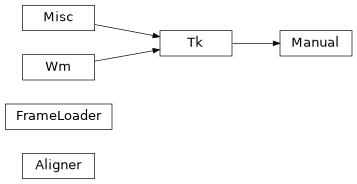
Class Inheritance Diagram
tools.manual.thumbnails Module
Thumbnail generator for the manual tool
- class tools.manual.thumbnails.ProgressBar(p_bar: tqdm | None = None)
Thread-safe progress bar for tracking thumbnail generation progress
- Parameters:
p_bar (tqdm | None)
- class tools.manual.thumbnails.ThumbsCreator(detected_faces: DetectedFaces, input_location: str, single_process: bool)
Background loader to generate thumbnails for the alignments file. Generates low resolution thumbnails in parallel threads for faster processing.
- Parameters:
detected_faces (DetectedFaces) – The
DetectedFaceobjects for this videoinput_location (str) – The location of the input folder of frames or video file
single_process (bool) –
Trueto generated thumbs in a single process otherwiseFalse
- generate_cache() None
Extract the face thumbnails from a video or folder of images into the alignments file
- Return type:
None
- property has_thumbs: bool
Trueif the alignments file holds thumbnail images otherwiseFalse.
- class tools.manual.thumbnails.VideoMeta(key_frames: list[int] | None = None, pts_times: list[int] | None = None)
Holds meta information about a video file
- Parameters:
key_frames (list[int] | None) – List of key frame indices for the video
pts_times (list[int] | None) – List of presentation timestamps for the video
Classes
|
Thread-safe progress bar for tracking thumbnail generation progress |
|
Background loader to generate thumbnails for the alignments file. |
|
Holds meta information about a video file |