tools.alignments package
tools.alignments.alignments Module
Tools for manipulating the alignments serialized file
- class tools.alignments.alignments.Alignments(arguments: Namespace)
The main entry point for Faceswap’s Alignments Tool. This tool is part of the Faceswap Tools suite and should be called from the
python tools.py alignmentscommand.The tool allows for manipulation, and working with Faceswap alignments files.
This parent class handles creating the individual job arguments when running in batch-mode or triggers the job when not running in batch mode
- Parameters:
arguments (
argparse.Namespace) – Theargparsearguments as passed in fromtools.py
- process()
The entry point for the Alignments tool from
lib.tools.alignments.cli.Launches the selected alignments job.
Classes
|
The main entry point for Faceswap's Alignments Tool. |
tools.alignments.cli Module
Command Line Arguments for tools
- class tools.alignments.cli.AlignmentsArgs(subparser: _SubParsersAction | None, command: str, description: str = 'default')
Class to parse the command line arguments for Alignments tool
- Parameters:
subparser (_SubParsersAction | None)
command (str)
description (str)
- static get_argument_list() list[dict[str, Any]]
Collect the argparse argument options.
- Returns:
The argparse command line options for processing by argparse
- Return type:
dict
- static get_info() str
Obtain command information.
- Returns:
The help text for displaying in argparses help output
- Return type:
str
Classes
|
Class to parse the command line arguments for Alignments tool |
tools.alignments.jobs Module
Tools for manipulating the alignments serialized file
- class tools.alignments.jobs.Check(alignments: AlignmentData, arguments: Namespace)
Frames and faces checking tasks.
- Parameters:
alignments (AlignmentData) – The loaded alignments corresponding to the frames to be annotated
arguments (Namespace) – The command line arguments that have called this job
- output_file(output_message: str, items_discovered: int) None
Save the output to a text file in the frames directory
- Parameters:
output_message (str) – The message to write out to file
items_discovered (int) – The number of items which matched the criteria
- Return type:
None
- process() None
Process the frames check against the alignments file
- Return type:
None
- class tools.alignments.jobs.Export(alignments: AlignmentData, arguments: Namespace)
Export alignments from a Faceswap .fsa file to a json formatted file.
- Parameters:
alignments (AlignmentData) – The alignments data loaded from an alignments file for this rename job
arguments (Namespace) – The
argparsearguments as passed in fromtools.py. Unused
- process() None
Parse the imported alignments file and output relevant information to a json file
- Return type:
None
- class tools.alignments.jobs.Sort(alignments: AlignmentData, arguments: Namespace)
Sort alignments’ index by the order they appear in an image in left to right order.
- Parameters:
alignments (AlignmentData) – The alignments data loaded from an alignments file for this rename job
arguments (Namespace) – The
argparsearguments as passed in fromtools.py. Unused
- process() None
Execute the sort process
- Return type:
None
- reindex_faces() int
Re-Index the faces
- Return type:
The count of re-indexed faces
- class tools.alignments.jobs.Spatial(alignments: AlignmentData, arguments: Namespace)
Apply spatial temporal filtering to landmarks
- Parameters:
alignments (AlignmentData) – The alignments data loaded from an alignments file for this rename job
arguments (Namespace) – The
argparsearguments as passed in fromtools.pyReference
---------
https (//www.kaggle.com/selfishgene/animating-and-smoothing-3d-facial-keypoints/notebook)
- process() None
Perform spatial filtering
- Return type:
None
Classes
|
Frames and faces checking tasks. |
|
Export alignments from a Faceswap .fsa file to a json formatted file. |
|
Sort alignments' index by the order they appear in an image in left to right order. |
|
Apply spatial temporal filtering to landmarks |
tools.alignments.jobs_faces Module
Tools for manipulating the alignments using extracted Faces as a source
- class tools.alignments.jobs_faces.FaceToFile(alignments: AlignmentData, face_data: list[PNGHeader])
Updates any optional/missing keys in the alignments file with any data that has been populated in a PNGHeader. Includes masks and identity fields.
- Parameters:
alignments (AlignmentData) – The loaded alignments containing faces to be removed
face_data (list[PNGHeader]) – List of
PNGHeaderobjects
- __call__() bool
Parse through the face data updating any entries in the alignments file.
- Return type:
Trueif any alignment information was updated otherwiseFalse
- class tools.alignments.jobs_faces.FromFaces(alignments: None, arguments: Namespace)
Scan a folder of Faceswap Extracted Faces and re-create the associated alignments file(s)
- Parameters:
alignments (None) – Parameter included for standard job naming convention, but not used for this process.
arguments (Namespace) – The
argparsearguments as passed in fromtools.py
- process() None
Run the job to read faces from a folder to create alignments file(s).
- Return type:
None
- class tools.alignments.jobs_faces.RemoveFaces(alignments: AlignmentData, arguments: Namespace)
Remove items from alignments file.
- Parameters:
alignments (AlignmentData) – The loaded alignments containing faces to be removed
arguments (Namespace) – The command line arguments that have called this job
- process() None
Run the job to remove faces from an alignments file that do not exist within a faces folder.
- Return type:
None
- class tools.alignments.jobs_faces.Rename(alignments: AlignmentData, arguments: Namespace | None, faces: Faces | None = None)
Rename faces in a folder to match their filename as stored in an alignments file.
- Parameters:
alignments (AlignmentData) – The alignments data loaded from an alignments file for this rename job
arguments (Namespace | None) – The
argparsearguments as passed in fromtools.pyfaces (Faces | None) – An optional faces object, if the rename task is being called by another job. Default:
None
- process() None
Process the face renaming
- Return type:
None
Classes
|
Updates any optional/missing keys in the alignments file with any data that has been populated in a PNGHeader. |
|
Scan a folder of Faceswap Extracted Faces and re-create the associated alignments file(s) |
|
Remove items from alignments file. |
|
Rename faces in a folder to match their filename as stored in an alignments file. |
tools.alignments.jobs_frames Module
Tools for manipulating the alignments using Frames as a source
- class tools.alignments.jobs_frames.Draw(alignments: AlignmentData, arguments: Namespace)
Draws annotations onto original frames and saves into a sub-folder next to the original frames.
- Parameters:
alignments (AlignmentData) – The loaded alignments corresponding to the frames to be annotated
arguments (Namespace) – The command line arguments that have called this job
- process() None
Runs the process to draw face annotations onto original source frames.
- Return type:
None
- class tools.alignments.jobs_frames.Extract(alignments: AlignmentData, arguments: Namespace)
Re-extract faces from source frames based on Alignment data
- Parameters:
alignments (AlignmentData) – The alignments data loaded from an alignments file for this rename job
arguments (Namespace) – The
argparsearguments as passed in fromtools.py
- process() None
Run the re-extraction from Alignments file process
- Return type:
None
Classes
|
Draws annotations onto original frames and saves into a sub-folder next to the original frames. |
|
Re-extract faces from source frames based on Alignment data |
tools.alignments.media Module
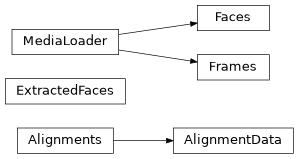
Media items (Alignments, Faces, Frames) for alignments tool
- class tools.alignments.media.AlignmentData(alignments_file: str)
Class to hold the alignment data
- Parameters:
alignments_file (str) – Full path to an alignments file
- static check_file_exists(alignments_file: str) tuple[str, str]
Check if the alignments file exists, and returns a tuple of the folder and filename.
- Parameters:
alignments_file (str) – Full path to an alignments file
- Returns:
folder – The full path to the folder containing the alignments file
filename – The filename of the alignments file
- Return type:
tuple[str, str]
- save() None
Backup copy of old alignments and save new alignments
- Return type:
None
- class tools.alignments.media.ExtractedFaces(frames: Frames, alignments: AlignmentData, size: int = 512)
Holds the extracted faces and matrix for alignments
- Parameters:
frames (Frames) – The frames object to extract faces from
alignments (AlignmentData) – The alignment data corresponding to the frames
size (int) – The extract face size. Default: 512
- extract_one_face(alignment: FileAlignments, image: np.ndarray) DetectedFace
Extract one face from image
- Parameters:
alignment (FileAlignments) – The alignment for a single face
image (np.ndarray) – The image to extract the face from
- Return type:
The detected face object for the given alignment with the aligned face loaded
- get_faces(frame: str, image: np.ndarray | None = None) None
Obtain faces and transformed landmarks for each face in a given frame with its alignments
- Parameters:
frame (str) – The frame name to obtain faces for
image (np.ndarray | None) – The image to extract the face from, if we already have it, otherwise
Noneto load the image. Default:None
- Return type:
None
- get_faces_in_frame(frame: str, update: bool = False, image: np.ndarray | None = None) list[DetectedFace]
Return the faces for the selected frame
- Parameters:
frame (str) – The frame name to get the faces for
update (bool) –
Trueif the faces should be refreshed regardless of current frame.Falseto not force a refresh. DefaultFalseimage (np.ndarray | None) – Image to load faces from if it exists, otherwise
Noneto load the image. Default:None
- Returns:
List of
DetectedFaceobjects for the frame, with the aligned faceloaded
- Return type:
list[DetectedFace]
- get_roi_size_for_frame(frame: str) list[int]
Return the size of the original extract box for the selected frame.
- Parameters:
frame (str) – The frame to obtain the original sized bounding boxes for
- Return type:
List of original pixel sizes of faces held within the frame
- class tools.alignments.media.Faces(folder: str, alignments: Alignments | None = None)
Object to load Extracted Faces from a folder.
- Parameters:
folder (str) – The folder to load faces from
alignments (Alignments | None) – The alignments object that contains the faces. This can be used for 2 purposes: - To update legacy hash based faces for <v2.1 alignments to png header based version. - When the remove-faces job is being run, when the process will only load faces that exist in the alignments file. Default:
None
- load_items() dict[str, list[int]]
Load the face names into dictionary.
- Return type:
The source filename as key with list of face indices for the frame as value
- class tools.alignments.media.Frames(folder: str, count: int | None = None)
Object to hold the frames that are to be checked against
- Parameters:
folder (str)
count (int | None)
- load_items() dict[str, tuple[str, str]]
Load the frame info into dictionary
- Return type:
Fullname as key, tuple of frame name and extension as value
- process_folder() Generator[dict[str, str], None, None]
Iterate through the frames folder pulling the base filename
- Yields:
The full frame name, the filename and the file extension of the frame
- Return type:
Generator[dict[str, str], None, None]
- process_frames() Generator[dict[str, str], None, None]
Process exported Frames
- Yields:
The full frame name, the filename and the file extension of the frame
- Return type:
Generator[dict[str, str], None, None]
- process_video() Generator[dict[str, str], None, None]
Dummy in frames for video
- Yields:
The full frame name, the filename and the file extension of the frame
- Return type:
Generator[dict[str, str], None, None]
- sorted_items() list[dict[str, str]]
Return the items sorted by filename
- Return type:
The sorted list of frame information
- class tools.alignments.media.MediaLoader(folder: str, count: int | None = None)
Class to load images.
- Parameters:
folder (str) – The folder of images or video file to load images from
count (int | None) – If the total frame count is known it can be passed in here which will skip analyzing a video file. If the count is not passed in, it will be calculated. Default:
None
- check_input_folder() VideoCapture | None
Ensure that the frames or faces folder exists and is valid. If frames folder contains a video file return cv2 reader object
- Return type:
Object for reading a video stream
- property count: int
Number of faces or frames
- property is_video: bool
Whether source is a video or not
- load_image(filename: str) np.ndarray
Load an image
- Parameters:
filename (str) – The filename of the image to load
- Return type:
The loaded image
- load_items() dict[str, list[int]] | dict[str, tuple[str, str]]
Override for specific item loading
- Return type:
dict[str, list[int]] | dict[str, tuple[str, str]]
- load_video_frame(filename: str) np.ndarray
Load a requested frame from video
- Parameters:
filename (str) – The frame name to load
- Return type:
The loaded image
- process_folder() Generator[dict[str, str], None, None] | Generator[tuple[str, PNGHeader], None, None]
Override for specific folder processing
- Return type:
Generator[dict[str, str], None, None] | Generator[tuple[str, PNGHeader], None, None]
- static save_image(output_folder: str, filename: str, image: np.ndarray, metadata: PNGHeader | None = None) None
Save an image
- Parameters:
filename (str) – The filename of the image to save
image (np.ndarray) – The image to save
metadata (PNGHeader | None) – Any faceswap metadata that should be saved
output_folder (str)
- Return type:
None
- sorted_items() list[dict[str, str]] | list[tuple[str, PNGHeader]]
Override for specific folder processing
- Return type:
list[dict[str, str]] | list[tuple[str, PNGHeader]]
- stream(skip_list: list[int] | None = None) Generator[tuple[str, np.ndarray], None, None]
Load the images in
folderin the order they are received fromlib.image.ImagesLoaderin a background thread.- Parameters:
skip_list (list[int] | None) – A list of frame indices that should not be loaded. Pass
Noneif all images should be loaded. Default:None- Yields:
filename – The filename of the image that is being returned
image – The image that has been loaded from disk
- Return type:
Generator[tuple[str, np.ndarray], None, None]
- static valid_extension(filename) bool
Check whether passed in file has a valid extension
- Return type:
bool
Classes
|
Class to hold the alignment data |
|
Holds the extracted faces and matrix for alignments |
|
Object to load Extracted Faces from a folder. |
|
Object to hold the frames that are to be checked against |
|
Class to load images. |
Class Inheritance Diagram