tools.preview package
tools.preview.cli Module
Command Line Arguments for tools
- class tools.preview.cli.PreviewArgs(subparser: _SubParsersAction | None, command: str, description: str = 'default')
Class to parse the command line arguments for Preview (Convert Settings) tool
- Parameters:
subparser (_SubParsersAction | None)
command (str)
description (str)
- static get_argument_list() list[dict[str, Any]]
Put the arguments in a list so that they are accessible from both argparse and gui
- Returns:
Top command line options for the preview tool
- Return type:
list[dict[str, Any]]
- static get_info() str
Return command information
- Returns:
Top line information about the Preview tool
- Return type:
str
Classes
|
Class to parse the command line arguments for Preview (Convert Settings) tool |
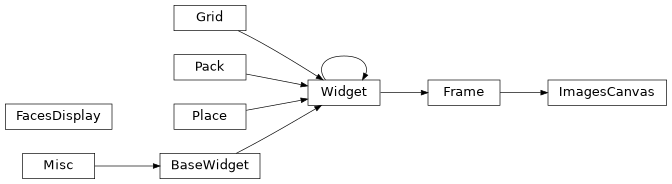
Class Inheritance Diagram

tools.preview.control_panels Module
Manages the widgets that hold the bottom ‘control’ area of the preview tool.
- class tools.preview.control_panels.ActionFrame(app: Preview, parent: ttk.Frame)
Frame that holds the left hand side options panel containing the command line options.
- Parameters:
app (Preview) – The main tkinter Preview app
parent (ttk.Frame) – The parent tkinter object that holds the Action Frame
- property busy_progress_bar: BusyProgressBar
The progress bar on the left hand side whilst a swap/patch is being applied.
- property convert_args: dict[str, Any]
Currently selected Command line arguments from the
ActionFrame.
- class tools.preview.control_panels.BusyProgressBar(parent: Frame)
An infinite progress bar for when a thread is running to swap/patch a group of samples
- Parameters:
parent (ttk.Frame)
- start() None
Start and display progress bar
- Return type:
None
- stop() None
Stop and hide progress bar
- Return type:
None
- class tools.preview.control_panels.ConfigFrame(parent: OptionsBook, config_key: str, options: dict[str, Any])
Holds the configuration options for a convert plugin inside the
OptionsBook.- Parameters:
parent (OptionsBook) – The tkinter object that will hold this configuration frame
config_key (str) – The section/plugin key for these configuration options
options (dict[str, T.Any]) – The options for this section/plugin
- class tools.preview.control_panels.ConfigTools(config_file: str | None)
Tools for loading, saving, setting and retrieving configuration file values.
- Parameters:
config_file (str | None) – Path to a custom config .ini file or
Noneto load the default config file
- tk_vars
Global tkinter variables. Refresh and Busy
tkinter.BooleanVar- Type:
dict[str, dict[str, tkinter.Variable]]
- property config_dicts: dict[str, dict[str, ControlPanelOption]]
The convert configuration options in dictionary form.
- property plugins_dict: dict[str, list[str]]
Dictionary of configuration option sections as key with a list of containing plugin names as the value
- reset_config_to_default(section: str | None = None) None
Reset the GUI parameters to their default configuration values.
- Parameters:
section (str | None) – The configuration section to reset the values for, If
Noneprovided then all sections are reset. Default:None- Return type:
None
- reset_config_to_saved(section: str | None = None) None
Reset the GUI parameters to their saved values within the configuration file.
- Parameters:
section (str | None) – The configuration section to reset the values for, If
Noneprovided then all sections are reset. Default:None- Return type:
None
- save_config(section: str | None = None) None
Save the configuration
.inifile with the currently stored values.- Parameters:
section (str | None) – The configuration section to save, If
Noneprovided then all sections are saved. Default:None- Return type:
None
- property sections: list[str]
The sorted section names that exist within the convert Configuration options.
- update_config() None
Update
configwith the currently selected values from the GUI.- Return type:
None
- class tools.preview.control_panels.OptionsBook(parent: ttk.Frame, config_tools: ConfigTools, patch_callback: Callable[[], None])
The notebook that holds the Convert configuration options.
- Parameters:
parent (ttk.Frame) – The parent tkinter object that holds the Options book
config_tools (ConfigTools) – Tools for loading and saving configuration files
patch_callback (Callable[[], None]) – The function to execute when a patch callback is received
- config_tools
Tools for loading and saving configuration files
Classes
|
Frame that holds the left hand side options panel containing the command line options. |
|
An infinite progress bar for when a thread is running to swap/patch a group of samples |
|
Holds the configuration options for a convert plugin inside the |
|
Tools for loading, saving, setting and retrieving configuration file values. |
|
The notebook that holds the Convert configuration options. |
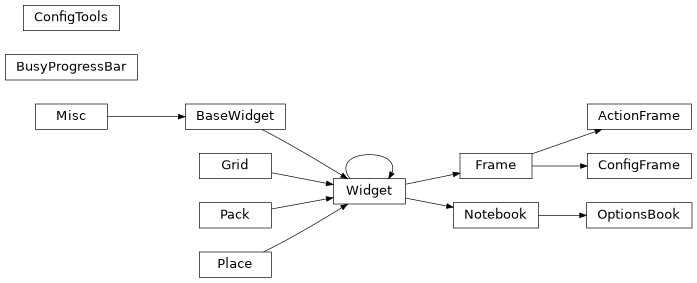
Class Inheritance Diagram
tools.preview.preview Module
Tool to preview swaps and tweak configuration prior to running a convert
- class tools.preview.preview.Dispatcher(app: Preview)
Handles the app level tk.Variables and the threading events. Dispatches events to the correct location and handles GUI state whilst events are handled
- Parameters:
app (Preview) – The main tkinter Preview app
- property needs_patch: Event
Set by the parent and cleared by the child. Informs the child patching thread that a run needs to be processed
- set_busy() None
Set the tkinter busy variable to
Trueand display the busy progress bar- Return type:
None
- set_needs_patch() None
Sends a trigger to the patching thread that it needs to be run. Waits for the patching to complete prior to triggering a display refresh and unsetting the busy indicators
- Return type:
None
- class tools.preview.preview.Patch(app: Preview, arguments: Namespace)
The Patch pipeline
Runs in it’s own thread. Takes the output from the Faceswap model predictor and runs the faces through the convert pipeline using the currently selected options.
- Parameters:
app (Preview) – The main tkinter Preview app
arguments (Namespace) – The
argparsearguments as passed in fromtools.py
- converter_arguments
The currently selected converter command line arguments for the patch queue
- Type:
dict[str, Any] | None
- class tools.preview.preview.Preview(arguments: Namespace)
This tool is part of the Faceswap Tools suite and should be called from
python tools.py previewcommand.Loads up 5 semi-random face swaps and displays them, cropped, in place in the final frame. Allows user to live tweak settings, before saving the final config to
./config/convert.ini- Parameters:
arguments (Namespace) – The
argparsearguments as passed in fromtools.py
- property config_tools: ConfigTools
The object responsible for parsing configuration options and updating to/from the GUI
- property dispatcher: Dispatcher
Responsible for triggering events and variables and handling global GUI state
- property display: FacesDisplay
The object that holds the sample, converted and patched faces
- property lock: lock
The threading lock object for the Preview GUI
- process() None
The entry point for the Preview tool from
lib.tools.cli.Launch the tkinter preview Window and run main loop.
- Return type:
None
- property progress_bar: BusyProgressBar
The progress bar that indicates a swap/patch thread is running
- update_display()
Update the images in the canvas and redraw
- class tools.preview.preview.Samples(app: Preview, arguments: Namespace, sample_size: int)
The display samples.
Obtains and holds
sample_sizesemi random test faces for displaying in the preview GUI.The file list is split into evenly sized groups of
sample_size. When a display set is generated, a random image from each of the groups is selected to provide an array of images across the length of the video.- Parameters:
app (Preview) – The main tkinter Preview app
arguments (Namespace) – The
argparsearguments as passed in fromtools.pysample_size (int) – The number of samples to take from the input video/images
- property alignments: Alignments
The alignments for the preview faces
- property available_masks: list[str]
The mask names that are available for every face in the alignments file
- generate() None
Generate a sample set.
Selects
sample_sizerandom faces. Runs them through prediction to obtain the swap, then trigger the patch event to run the faces through patching.- Return type:
None
- property predicted_images: list[tuple[ConvertItem, ndarray]]
The predicted faces output from the Faceswap model
- property sample_size: int
The number of samples to take from the input video/images
Classes
|
Handles the app level tk.Variables and the threading events. |
|
The Patch pipeline |
|
This tool is part of the Faceswap Tools suite and should be called from |
|
The display samples. |
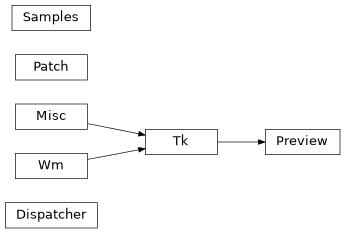
Class Inheritance Diagram
tools.preview.viewer Module
Manages the widgets that hold the top ‘viewer’ area of the preview tool
- class tools.preview.viewer.FacesDisplay(app: Preview, size: int, padding: int, num_faces: int)
Compiles the 2 rows of sample faces (original and swapped) into a single image
- Parameters:
app (Preview) – The main tkinter Preview app
size (int) – The size of each individual face sample in pixels
padding (int) – The amount of extra padding to apply to the outside of the face
num_faces (int) – The number of faces to be displayed in the preview window
- destination: list[ndarray]
The list of
numpy.ndarrayswapped and patched preview images for bottom row of display
- set_centering_offset(centering: Literal['face', 'head', 'legacy'], y_offset: float) None
The centering and y-offset that the model uses is not known at initialization time. Set
_centeringand y_offset when the model has been loaded.- Parameters:
centering (Literal['face', 'head', 'legacy']) – The centering that the model was trained on
y_offset (float)
- Return type:
None
- set_display_dimensions(dimensions: tuple[int, int]) None
Adjust the size of the frame that will hold the preview samples.
- Parameters:
dimensions (tuple[int, int]) – The (width, height) of the frame that holds the preview
- Return type:
None
- source: list[ConvertItem]
The list of
numpy.ndarraysource preview images for top row of display
- property tk_image: PhotoImage | None
The compiled preview display in tkinter display format
- update_source: bool
Flag to indicate that the source images for the preview have been updated, so the preview should be recompiled.
- class tools.preview.viewer.ImagesCanvas(app: Preview, parent: ttk.PanedWindow)
tkinter Canvas that holds the preview images.
- Parameters:
app (Preview) – The main tkinter Preview app
parent (ttk.PanedWindow) – The parent tkinter object that holds the canvas
- reload() None
Update the images in the canvas and redraw.
- Return type:
None
Classes
|
Compiles the 2 rows of sample faces (original and swapped) into a single image |
|
tkinter Canvas that holds the preview images. |
Class Inheritance Diagram