scripts package
The Scripts Package is the entry point into Faceswap.
scripts.convert Module
Main entry point to the convert process of FaceSwap
- class scripts.convert.Convert(arguments: Namespace)
The Faceswap Face Conversion Process.
The conversion process is responsible for swapping the faces on source frames with the output from a trained model.
It leverages a series of user selected post-processing plugins, executed from
lib.convert.Converter.The convert process is self contained and should not be referenced by any other scripts, so it contains no public properties.
- Parameters:
arguments (Namespace) – The arguments to be passed to the convert process as generated from Faceswap’s command line arguments
- process() None
The entry point for triggering the Conversion Process.
Should only be called from
lib.cli.launcher.ScriptExecutor- Raises:
FaceswapError – Error raised if the process runs out of memory
- Return type:
None
- class scripts.convert.ConvertItem(inbound: FrameFaces, feed_faces: list[AlignedFace] = <factory>, reference_faces: list[AlignedFace] = <factory>, swapped_faces: ndarray = <factory>)
A single frame with associated objects passing through the convert process.
- Parameters:
input – The FrameFaces object holding the
filename,imageand attr:list ofDetectedFaceobjects loaded from diskfeed_faces (list[lib.align.aligned_face.AlignedFace]) – list of
lib.align.AlignedFaceobjects for feeding into the model’s predict functionreference_faces (list[lib.align.aligned_face.AlignedFace]) – list of
lib.align.AlignedFaceobjects at model output sized for using as reference in the convert function for feeding into the model’s predictswapped_faces (numpy.ndarray) – The swapped faces returned from the model’s predict function
inbound (FrameFaces)
- class scripts.convert.DiskIO(alignments: fs_media.Alignments, images: ImagesLoader, predictor: Predict, arguments: Namespace)
Disk Input/Output for the converter process.
- Background threads to:
Load images from disk and get the detected faces
Save images back to disk
- Parameters:
alignments (fs_media.Alignments) – The alignments for the input video
images (ImagesLoader) – The input images
predictor (Predict) – The object for generating predictions from the model
arguments (Namespace) – The arguments that were passed to the convert process as generated from Faceswap’s command line arguments
- property completion_event: Event
Event is set when the DiskIO Save task is complete
- property draw_transparent: bool
Trueif the selected writer can output transparent and it’s Draw_transparent configuration item is set otherwiseFalse
- property load_queue: EventQueue
The queue that images and detected faces are loaded into.
- property load_thread: MultiThread
The thread that is running the image loading operation.
- property pre_encode: Callable[[np.ndarray, T.Any], list[bytes]] | None
Selected writer’s pre-encode function, if it has one, otherwise
None- Type:
python function
- property save_thread: MultiThread
The thread that is running the image writing operation.
- class scripts.convert.OptionalActions(arguments: Namespace, input_images: list[str], alignments: fs_media.Alignments)
Process specific optional actions for Convert.
Currently only handles skip faces. This class should probably be (re)moved.
- Parameters:
arguments (Namespace) – The arguments that were passed to the convert process as generated from Faceswap’s command line arguments
input_images (list[str]) – List of input image files
alignments (fs_media.Alignments) – The alignments file for this conversion
- class scripts.convert.Predict(queue_size: int, arguments: Namespace)
Obtains the output from the Faceswap model.
- Parameters:
queue_size (int) – The maximum size of the input queue
arguments (Namespace) – The arguments that were passed to the convert process as generated from Faceswap’s command line arguments
- property centering: CenteringType
The centering that the model was trained on (“head”, “face” or “legacy”)
- property coverage_ratio: float
The coverage ratio that the model was trained at.
- Type:
float
- property faces_count: int
The total number of faces seen by the Predictor.
- property has_predicted_mask: bool
Trueif the model was trained to learn a mask, otherwiseFalse.
- property in_queue: EventQueue
The input queue to the predictor.
- launch(load_queue: EventQueue) None
Launch the prediction process in a background thread.
Starts the prediction thread and returns the thread.
- Parameters:
load_queue (EventQueue) – The queue that contains images and detected faces for feeding the model
- Return type:
None
- load_aligned(item: ConvertItem) None
Load the model’s feed faces and the reference output faces.
For each detected face in the incoming item, load the feed face and reference face images, correctly sized for input and output respectively.
- Parameters:
item (ConvertItem) – The convert media object, containing the FrameFaces for the current image
- Return type:
None
- property out_queue: EventQueue
The output queue from the predictor.
- property output_size: int
The size in pixels of the Faceswap model output.
- property thread: MultiThread
The thread that is running the prediction function from the Faceswap model.
- property verify_output: bool
Trueif multiple faces have been found in frames, otherwiseFalse.
- property y_offset: float
The selected model y-offset value
Classes
|
The Faceswap Face Conversion Process. |
|
A single frame with associated objects passing through the convert process. |
|
Disk Input/Output for the converter process. |
|
Process specific optional actions for Convert. |
|
Obtains the output from the Faceswap model. |
scripts.extract Module
Main entry point to the extract process of FaceSwap
- class scripts.extract.BatchInfo(loader: Loader, alignments: Alignments)
Holds information about each input batch being processed through extract
- Parameters:
loader (scripts.extract.Loader) – The images loader for the batch
alignments (scripts.fs_media.Alignments) – The alignments for the input
- alignments: Alignments = <dataclasses._MISSING_TYPE object>
The alignments for the input
- class scripts.extract.DebugLandmarks(size: int)
Draw debug landmarks on face output.
- Parameters:
size (int) – The size of the extracted face image
- __call__(faces: npt.NDArray[np.uint8], matrices: npt.NDArray[np.float32], media: FrameFaces) None
Draw debug annotations on extracted face images
- Parameters:
faces (npt.NDArray[np.uint8]) – The aligned face images that are to be saved to disk
matrices (npt.NDArray[np.float32]) – The adjustment matrices for transforming from frame space to face space
media (FrameFaces) – The corresponding FrameFaces media object for the faces
- Return type:
None
- class scripts.extract.Extract(arguments: Namespace)
The Faceswap Face Extraction Process.
The extraction process is responsible for detecting faces in a series of images/video, aligning them and optionally collecting further data about each face leveraging various user selected plugins
- Parameters:
arguments (Namespace) – The arguments to be passed to the extraction process as generated from Faceswap’s command line arguments
- process() None
Run the extraction process
- Return type:
None
- class scripts.extract.Loader(pipeline: ExtractRunner, input_path: str, input_is_file: bool, extract_every: int, skip_existing_frames: bool, skip_existing_faces: bool, is_final: bool)
Loads images/video frames from disks and puts to queue for feeding the extraction pipeline
- Parameters:
pipeline (ExtractRunner) – The final plugin in the extraction pipeline
input_path (str) – Full path to a folder of images or a video file
input_is_file (bool) –
Trueif the input plugin to the pipeline is an alignments file (fsa or json) so detected faces should be loaded from the file and passed into the pipelineextract_every (int) – The number of frames to extract from the source. 1 will extract every frame, 5 every 5th frame etc
skip_existing_frames (bool) –
Trueif existing extracted frames should be skippedskip_existing_faces (bool) –
Trueif frames with existing face detections should be skippedis_final (bool) –
Trueif this loader is for the final batch being processed
- property count: int
The number of frames to be processed
- property error_state: ErrorState
The global FSThread error state object
- existing_count
The number of frames that pre-exist within the alignments file that will be skipped because skip_existing/skip_existing_faces has been selected
- property is_video: bool
Trueif the input location is a video file,Falsefor folder of images
- join() None
Join the image loading thread and monitor for keyboard interrupts
- Return type:
None
- location
Full path to the input location for the loader
- start(alignments: dict[str, AlignmentsEntry]) None
Set the skip list and start loading images from disk
- Parameters:
alignments (dict[str, AlignmentsEntry]) – Dictionary of existing alignments data for use when importing or skipping existing data
- Return type:
None
- class scripts.extract.Output(pipeline: ExtractRunner, output_folder: str | None, size: int, min_scale: int, batches: list[BatchInfo], save_interval: int, debug_landmarks: bool)
Handles output processing and saving of extracted faces
- Parameters:
pipeline (ExtractRunner) – The output runner from the extraction pipeline
output_folder (str | None) – The full path to the output folder to save extracted faces.
Noneto not save facessize (int) – The size to save extracted faces at
min_scale (int) – The minimum percentage of the output size that should be accepted for outputting a face to disk
batches (list[BatchInfo]) – The information about each batch that is to be processed
save_interval (int) – How often to save the alignments file
debug_landmarks (bool) –
Trueto annotate the output images with debug data
- join() None
Join the output thread
- Return type:
None
- start() None
Start the output thread
- Return type:
None
Classes
|
Holds information about each input batch being processed through extract |
|
Draw debug landmarks on face output. |
|
The Faceswap Face Extraction Process. |
|
Loads images/video frames from disks and puts to queue for feeding the extraction pipeline |
|
Handles output processing and saving of extracted faces |
scripts.fs_media Module
Helper functions for extract and convert.
Holds the classes for the 2 main Faceswap ‘media’ objects: Images and Alignments.
Holds optional pre/post processing functions for convert and extract.
- class scripts.fs_media.Alignments(location: str | None, source_location: str, is_extract: bool, skip_existing_frames: bool = False, skip_existing_faces: bool = False, plugin_is_file: bool = False, save_alignments: bool = False, input_is_video: bool = False)
Override
lib.align.Alignmentsto add custom loading based on command line arguments.- Parameters:
location (str | None) – Full path to the alignments file.
Noneto derive from the source file locationsource_location (str) – Full path to the source media for the alignments file. Either a folder of images or a video file
arguments – The command line arguments that were passed to Faceswap
is_extract (bool) –
Trueif the process calling this class is extraction. Default:Falseskip_existing_frames (bool) – For extracting, indicates that ‘skip existing’ frames has been selected. Default:
Falseskip_existing_faces (bool) – For extracting, indicates that ‘skip existing faces’ has been selected. Default:
Falseplugin_is_file (bool) –
Trueif ‘File’ has been selected for either/or a detector or aligner, indicating that information may be being loaded from a json filesave_alignments (bool) –
Trueif the alignments are to be saved at the end of the running process, based on the selected extraction pluginsinput_is_video (bool) –
Trueif the input to the process is a video,Falseif it is a folder of images. Default:False
- property save_alignments: bool
Trueif the alignments should be saved at the end of the running process
- scripts.fs_media.finalize(images_found: int, num_faces_detected: int, verify_output: bool) None
Output summary statistics at the end of the extract or convert processes.
- Parameters:
images_found (int) – The number of images/frames that were processed
num_faces_detected (int) – The number of faces that have been detected
verify_output (bool) –
Trueif multiple faces were detected in frames otherwiseFalse.
- Return type:
None
Functions
|
Output summary statistics at the end of the extract or convert processes. |
Classes
|
Override |
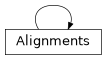
Class Inheritance Diagram
scripts.gui Module
The optional GUI for faceswap
- class scripts.gui.FaceswapGui(debug, config_file)
The Graphical User Interface
Launch the Faceswap GUI
- Parameters:
debug (bool) – Output to the terminal rather than to Faceswap’s internal console
config_file (str | None) – Path to a custom .ini configuration file.
Noneto use the default config file
- add_containers()
Add the paned window containers that hold each main area of the gui
- build_gui(rebuild=False)
Build the GUI
- close_app(*args)
Close Python. This is here because the graph animation function continues to run even when tkinter has gone away
- initialize_globals()
Initialize config and images global constants
- rebuild()
Rebuild the GUI on config change
- set_fonts()
Set global default font
- set_initial_focus()
Set the tab focus from settings
- set_layout()
Set initial layout
Classes
|
The Graphical User Interface |
|
The GUI process. |
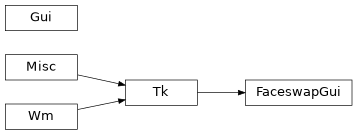
Class Inheritance Diagram
scripts.train Module
Main entry point to the training process of FaceSwap
- class scripts.train.PreviewInterface(use_preview: bool)
Run the preview window in a thread and interface with it
- Parameters:
use_preview (bool) –
Trueif pop-up preview window has been requested otherwiseFalse
- property buffer: PreviewBuffer
The thread save preview image object
- property should_quit: bool
Check whether an exit request has been made.
Trueif an exit request has been made otherwiseFalse.- Raises:
Error – Re-raises any error within the preview thread
- property should_refresh: bool
Check whether the preview should be updated and return the value. If
Trueis returned then resets the refresh trigger back toFalse
- property should_save: bool
Check whether a save request has been made. If
Trueis returned then save trigger is set back toFalse
- property should_toggle_mask: bool
Check whether the mask should be toggled and return the value. If
Trueis returned then resets mask toggle back toFalse
- shutdown() None
Send a signal to shutdown the preview window.
- Return type:
None
- class scripts.train.Train(arguments: argparse.Namespace)
The Faceswap Training Process.
The training process is responsible for training a model on a set of source faces and a set of destination faces.
The training process is self contained and should not be referenced by any other scripts, so it contains no public properties.
- Parameters:
arguments (argparse.Namespace) – The arguments to be passed to the training process as generated from Faceswap’s command line arguments
- process() None
The entry point for triggering the Training Process.
Should only be called from
lib.cli.launcher.ScriptExecutor- Return type:
None
Classes
|
Run the preview window in a thread and interface with it |
|
The Faceswap Training Process. |