lib.gui package
The GUI Package contains the entire code base for Faceswap’s optional GUI. The GUI itself
is largely self-generated from the command line options specified in lib.cli.args.
analysis package
lib.gui.analysis.event_reader Module
Handles the loading and collation of events from Tensorboard event log files.
- class lib.gui.analysis.event_reader.EventData(timestamp: float = 0.0, loss: list[float] = <factory>)
Holds data collected from Tensorboard Event Files
- Parameters:
timestamp (float) – The timestamp of the event step (iteration)
loss (list[float]) – The loss values collected for A and B sides for the event step
- class lib.gui.analysis.event_reader.TensorBoardLogs(logs_folder: str, is_training: bool)
Parse data from TensorBoard logs.
Process the input logs folder and stores the individual filenames per session.
Caches timestamp and loss data on request and returns this data from the cache.
- Parameters:
logs_folder (str) – The folder that contains the Tensorboard log files
is_training (bool) –
Trueif the events are being read whilst Faceswap is training otherwiseFalse
- get_loss(session_id: int | None = None) dict[int, dict[str, ndarray]]
Read the loss from the TensorBoard event logs
- Parameters:
session_id (int | None) – The Session ID to return the loss for. Set to
Noneto return all session losses. DefaultNone- Returns:
The session id(s) as key, with a further dictionary as value containing the loss name and
list of loss values for each step
- Return type:
dict[int, dict[str, ndarray]]
- get_timestamps(session_id: int | None = None) dict[int, ndarray]
Read the timestamps from the TensorBoard logs.
As loss timestamps are slightly different for each loss, we collect the timestamp from the batch_loss key.
- Parameters:
session_id (int | None) – The Session ID to return the timestamps for. Set to
Noneto return all session timestamps. DefaultNone- Return type:
The session id(s) as key with list of timestamps per step as value
- property session_ids: list[int]
Sorted list of integers of available session ids.
- set_training(is_training: bool) bool
Set the internal training flag to the given is_training value.
If a new training session is being instigated, refresh the log filenames
- Parameters:
is_training (bool) –
Trueto indicate that the logs to be read are from the currently training session otherwiseFalse- Returns:
Trueif the session that is starting training belongs to the session already loadedotherwise
False
- Return type:
bool
Classes
|
Holds data collected from Tensorboard Event Files |
|
Parse data from TensorBoard logs. |
lib.gui.analysis.stats Module
Stats functions for the GUI.
Holds the globally loaded training session. This will either be a user selected session (loaded in the analysis tab) or the currently training session.
- class lib.gui.analysis.stats.Calculations(session_id, display: str = 'loss', loss_keys: list[str] | str = 'loss', selections: list[str] | str = 'raw', avg_samples: int = 500, smooth_amount: float = 0.9, flatten_outliers: bool = False)
Class that performs calculations on the
GlobalSessionraw data for the given session id.- Parameters:
session_id (int or
None) – The session id number for the selected session from the Analysis tab. Should beNoneif all sessions are being calculateddisplay ({"loss", "rate"}, optional) – Whether to display a graph for loss or training rate. Default: “loss”
loss_keys (list, optional) – The list of loss keys to display on the graph. Default: [“loss”]
selections (list, optional) – The selected annotations to display. Default: [“raw”]
avg_samples (int, optional) – The number of samples to use for performing moving average calculation. Default: 500.
smooth_amount (float, optional) – The amount of smoothing to apply for performing smoothing calculation. Default: 0.9.
flatten_outliers (bool, optional) –
Trueif values significantly away from the average should be excluded, otherwiseFalse. Default:False
- property iterations: int
The number of iterations in the data set.
- Type:
int
- refresh() Calculations | None
Refresh the stats
- Return type:
Calculations | None
- set_iterations_limit(limit: int) None
Set the number of iterations to display in the calculations.
If a value greater than 0 is passed, then the latest iterations up to the given limit will be calculated.
- Parameters:
limit (int) – The number of iterations to calculate data for. 0 to calculate for all data
- Return type:
None
- set_smooth_amount(amount: float) None
Set the amount of smoothing to apply to smoothed graph.
- Parameters:
amount (float) – The amount of smoothing to apply to smoothed graph
- Return type:
None
- property start_iteration: int
The starting iteration number of a limit has been set on the amount of data.
- Type:
int
- property stats: dict[str, ndarray]
The final calculated statistics
- Type:
dict
- update_selections(selection: str, option: bool) None
Update the type of selected data.
- Parameters:
selection (str) – The selection to update (as can exist in
_selections)option (bool) –
Trueif the selection should be included,Falseif it should be removed
- Return type:
None
- class lib.gui.analysis.stats.GlobalSession
Holds information about a loaded or current training session by accessing a model’s state file and Tensorboard logs. This class should not be accessed directly, rather through
lib.gui.analysis.Session- property batch_sizes: dict[int, int]
The batch sizes for each session_id for the model.
- Type:
dict
- clear() None
Clear the currently loaded session.
- Return type:
None
- property full_summary: list[dict]
List of dictionaries containing summary statistics for each session id.
- Type:
list
- get_loss(session_id: int | None) dict[str, ndarray]
Obtain the loss values for the given session_id.
- Parameters:
session_id (int or
None) – The session ID to return loss for. PassNoneto return loss for all sessions.- Returns:
Loss names as key,
numpy.ndarrayas value. If No session ID was provided all session’s losses are collated- Return type:
dict
- get_loss_keys(session_id: int | None) list[str]
Obtain the loss keys for the given session_id.
- Parameters:
session_id (int or
None) – The session ID to return the loss keys for. PassNoneto return loss keys for all sessions.- Returns:
The loss keys for the given session. If
Noneis passed as session_id then a unique list of all loss keys for all sessions is returned- Return type:
list
- get_timestamps(session_id: None) dict[int, ndarray]
- get_timestamps(session_id: int) ndarray
Obtain the time stamps keys for the given session_id.
- Parameters:
session_id (int or
None) – The session ID to return the time stamps for. PassNoneto return time stamps for all sessions.- Returns:
If a session ID has been given then a single
numpy.ndarraywill be returned with the session’s time stamps. Otherwise a ‘dict’ will be returned with the session IDs as key withnumpy.ndarrayof timestamps as values- Return type:
dict[int] or
numpy.ndarray
- property have_session_data: bool
Trueif session data is available otherwiseFalse- Type:
bool
- initialize_session(model_folder: str, model_name: str, is_training: bool = False) None
Initialize a Session.
Load’s the model’s state file, and sets the paths to any underlying Tensorboard logs, ready for access on request.
- Parameters:
model_folder (str,) – If loading a session manually (e.g. for the analysis tab), then the path to the model folder must be provided. For training sessions, this should be passed through from the launcher
model_name (str, optional) – If loading a session manually (e.g. for the analysis tab), then the model filename must be provided. For training sessions, this should be passed through from the launcher
is_training (bool, optional) –
Trueif the session is being initialized for a training session, otherwiseFalse. Default:False
- Return type:
None
- property is_loaded: bool
Trueif session data is loaded otherwiseFalse- Type:
bool
- property is_training: bool
Trueif the loaded session is the currently training model, otherwiseFalse- Type:
bool
- property logging_disabled: bool
Trueif logging is disabled for the currently training session otherwiseFalse.- Type:
bool
- property model_filename: str
The full model filename
- Type:
str
- property session_ids: list[int]
The sorted list of all existing session ids in the state file
- Type:
list
- stop_training() None
Clears the internal training flag. To be called when training completes.
- Return type:
None
- class lib.gui.analysis.stats.SessionsSummary(session: GlobalSession)
Performs top level summary calculations for each session ID within the loaded or currently training Session for display in the Analysis tree view.
- Parameters:
session (
GlobalSession) – The loaded or currently training session
- get_summary_stats() list[dict]
Compile the individual session statistics and calculate the total.
Format the stats for display
- Returns:
A list of summary statistics dictionaries containing the Session ID, start time, end time, elapsed time, rate, batch size and number of iterations for each session id within the loaded data as well as the totals.
- Return type:
list
Classes
|
Class that performs calculations on the |
Holds information about a loaded or current training session by accessing a model's state file and Tensorboard logs. |
|
|
Performs top level summary calculations for each session ID within the loaded or currently training Session for display in the Analysis tree view. |
lib.gui.analysis.moving_average Module
Calculate Exponential Moving Average for faceswap GUI Stats.
- class lib.gui.analysis.moving_average.ExponentialMovingAverage(data: ndarray, amount: float)
Reshapes data before calculating exponential moving average, then iterates once over the rows to calculate the offset without precision issues.
- Parameters:
data (
numpy.ndarray) – A 1 dimensional numpy array to obtain smoothed data foramount (float) – in the range (0.0, 1.0) The alpha parameter (smoothing amount) for the moving average.
Notes
Adapted from: https://stackoverflow.com/questions/42869495
- __call__() ndarray
Perform the exponential moving average calculation.
- Returns:
The smoothed data
- Return type:
numpy.ndarray
Classes
|
Reshapes data before calculating exponential moving average, then iterates once over the rows to calculate the offset without precision issues. |
utils package
lib.gui.utils.config Module
Global configuration options for the Faceswap GUI
- class lib.gui.utils.config.Config(root: tk.Tk, cli_opts: CliOptions | None, statusbar: StatusBar | None)
The centralized configuration class for holding items that should be made available to all parts of the GUI.
This class should be initialized on GUI startup through
initialize_config(). Any further access to this class should be throughget_config().- Parameters:
root (
tkinter.Tk) – The root Tkinter objectcli_opts (
lib.gui.options.CliOptionsorNone) – The command line options object. Must be provided for main GUI. Must beNonefor toolsstatusbar (
lib.gui.custom_widgets.StatusBarorNone) – The GUI Status bar. Must be provided for main GUI. Must beNonefor tools
- property cli_opts: CliOptions
The command line options for this GUI Session.
- property command_notebook: CommandNotebook | None
The main Faceswap Command Notebook.
- property default_font: tuple[str, int]
The selected font as configured in user settings. First item is the font (str) second item the font size (int).
- Type:
tuple
- property default_options: dict[str, dict[str, Any]]
The default options for all tabs
- Type:
dict
- property modified_vars: dict[str, BooleanVar]
The command notebook modified tkinter variables.
- Type:
dict
- property path_cache: str
The path to the GUI cache folder
- Type:
str
- property root: Tk
The root tkinter window.
- Type:
tkinter.Tk
- property scaling_factor: float
The scaling factor for current display.
- Type:
float
- set_active_tab_by_name(name: str) None
Sets the
command_notebookortools_notebookto active based on given name.- Parameters:
name (str) – The name of the tab to set active
- Return type:
None
- set_command_notebook(notebook: CommandNotebook) None
Set the command notebook to the
command_notebookattribute and enable the modified callback forproject.- Parameters:
notebook (
lib.gui.command.CommandNotebook) – The main command notebook for the Faceswap GUI- Return type:
None
- set_cursor_busy(widget: Widget | None = None) None
Set the root or widget cursor to busy.
- Parameters:
widget (tkinter object, optional) – The widget to set busy cursor for. If the provided value is
Nonethen sets the cursor busy for the whole of the GUI. Default:None.- Return type:
None
- set_cursor_default(widget: Widget | None = None) None
Set the root or widget cursor to default.
- Parameters:
widget (tkinter object, optional) – The widget to set default cursor for. If the provided value is
Nonethen sets the cursor busy for the whole of the GUI. Default:None- Return type:
None
- set_default_options() None
Set the default options for
lib.gui.projectsThe Default GUI options are stored on Faceswap startup.
Exposed as the
_default_optsfor a project cannot be set until after the main Command Tabs have been loaded.- Return type:
None
- set_geometry(width: int, height: int, fullscreen: bool = False) None
Set the geometry for the root tkinter object.
- Parameters:
width (int) – The width to set the window to (prior to scaling)
height (int) – The height to set the window to (prior to scaling)
fullscreen (bool, optional) – Whether to set the window to full-screen mode. If
Truethenwidthandheightare ignored. Default:False
- Return type:
None
- set_modified_true(command: str) None
Set the modified variable to
Truefor the given command inmodified_vars.- Parameters:
command (str) – The command to set the modified state to
True- Return type:
None
- set_root_title(text: str | None = None) None
Set the main title text for Faceswap.
The title will always begin with ‘Faceswap.py’. Additional text can be appended.
- Parameters:
text (str, optional) – Additional text to be appended to the GUI title bar. Default:
None- Return type:
None
- property tk_vars: GlobalVariables
The global tkinter variables.
- Type:
dict
- property tools_notebook: ToolsNotebook
The Faceswap Tools sub-Notebook.
- property user_theme: dict[str, Any]
The GUI theme selection options.
- Type:
dict
- class lib.gui.utils.config.GlobalVariables
Global tkinter variables accessible from all parts of the GUI. Should only be accessed from
get_config().tk_vars- property action_command: StringVar
The command line action to perform
- Type:
tkinter.StringVar
- property analysis_folder: StringVar
Full path the analysis folder
- Type:
tkinter.StringVar
- property console_clear: BooleanVar
Trueif the console should be cleared otherwiseFalse- Type:
tkinter.BooleanVar
- property display: StringVar
The current Faceswap command running
- Type:
tkinter.StringVar
- property generate_command: StringVar
The command line action to generate
- Type:
tkinter.StringVar
- property is_training: BooleanVar
Trueif Faceswap is currently training otherwiseFalse- Type:
tkinter.BooleanVar
- property refresh_graph: BooleanVar
Trueif the training graph should be refreshed otherwiseFalse- Type:
tkinter.BooleanVar
- property running_task: BooleanVar
Trueif a Faceswap task is running otherwiseFalse- Type:
tkinter.BooleanVar
- lib.gui.utils.config.get_config() Config
Get the Master GUI configuration.
- Returns:
The Master GUI Config
- Return type:
- lib.gui.utils.config.initialize_config(root: tk.Tk, cli_opts: CliOptions | None, statusbar: StatusBar | None) Config | None
Initialize the GUI Master
Configand add to global constant.This should only be called once on first GUI startup. Future access to
Configshould only be executed throughget_config().- Parameters:
root (
tkinter.Tk) – The root Tkinter objectcli_opts (
lib.gui.options.CliOptionsorNone) – The command line options object. Must be provided for main GUI. Must beNonefor toolsstatusbar (
lib.gui.custom_widgets.StatusBarorNone) – The GUI Status bar. Must be provided for main GUI. Must beNonefor tools
- Returns:
Noneif the config has already been initialized otherwise the global configuration options- Return type:
ConfigorNone
Functions
Get the Master GUI configuration. |
|
|
Initialize the GUI Master |
Classes
|
The centralized configuration class for holding items that should be made available to all parts of the GUI. |
Global tkinter variables accessible from all parts of the GUI. |
lib.gui.utils.file_handler Module
File browser utility functions for the Faceswap GUI.
- class lib.gui.utils.file_handler.FileHandler(handle_type: Literal['open', 'save', 'filename', 'filename_multi', 'save_filename', 'context', 'dir'], file_type: Literal['default', 'alignments', 'config_project', 'config_task', 'config_all', 'csv', 'image', 'ini', 'json', 'state', 'log', 'video'] | None, title: str | None = None, initial_folder: str | None = None, initial_file: str | None = None, command: str | None = None, action: str | None = None, variable: str | None = None, parent: Frame | Frame | None = None)
Handles all GUI File Dialog actions and tasks.
- Parameters:
handle_type (['open', 'save', 'filename', 'filename_multi', 'save_filename', 'context', 'dir']) – The type of file dialog to return. open and save will perform the open and save actions and return the file. filename returns the filename from an open dialog. filename_multi allows for multi-selection of files and returns a list of files selected. save_filename returns the filename from a save as dialog. context is a context sensitive parameter that returns a certain dialog based on the current options. dir asks for a folder location.
file_type ([‘default’, ‘alignments’, ‘config_project’, ‘config_task’, ‘config_all’, ‘csv’, ‘image’, ‘ini’, ‘state’, ‘log’, ‘video’] or
None) – The type of file that this dialog is for. default allows selection of any files. Other options limit the file type selectiontitle (str, optional) – The title to display on the file dialog. If None then the default title will be used. Default:
Noneinitial_folder (str, optional) – The folder to initially open with the file dialog. If None then tkinter will decide. Default:
Noneinitial_file (str, optional) – The filename to set with the file dialog. If None then tkinter no initial filename is. specified. Default:
Nonecommand (str, optional) – Required for context handling file dialog, otherwise unused. Default:
Noneaction (str, optional) – Required for context handling file dialog, otherwise unused. Default:
Nonevariable (str, optional) – Required for context handling file dialog, otherwise unused. The variable to associate with this file dialog. Default:
Noneparent (
tkinter.Frame|tkinter.ttk.Frame, optional) – The parent that is launching the file dialog.Nonesets this to root. Default:None
- return_file
The return value from the file dialog
- Type:
str or object
Example
>>> handler = FileHandler('filename', 'video', title='Select a video...')
>>> video_file = handler.return_file
>>> print(video_file)
'/path/to/selected/video.mp4'
Classes
|
Handles all GUI File Dialog actions and tasks. |
lib.gui.utils.image Module
Utilities for handling images in the Faceswap GUI
- class lib.gui.utils.image.Images
The centralized image repository for holding all icons and images required by the GUI.
This class should be initialized on GUI startup through
initialize_images(). Any further access to this class should be throughget_images().- delete_preview() None
Delete the preview files in the cache folder and reset the image cache.
Should be called when terminating tasks, or when Faceswap starts up or shuts down.
- Return type:
None
- property icons: dict[str, PhotoImage]
The faceswap icons for all parts of the GUI. The dictionary key is the icon name (str) the value is the icon sized and formatted for display (
PIL.ImageTK.PhotoImage).Example
>>> icons = get_images().icons
>>> save = icons["save"]
>>> button = ttk.Button(parent, image=save)
>>> button.pack()
- Type:
dict
- property preview_extract: PreviewExtract
PreviewTrainThe object handling the training preview images
- property preview_train: PreviewTrain
PreviewTrainThe object handling the training preview images
- class lib.gui.utils.image.PreviewExtract(cache_path: str)
Handles the loading of preview images for extract and convert
- Parameters:
cache_path (str) – Full path to the cache folder that contains the preview images
- delete_previews() None
Remove any image preview files
- Return type:
None
- property image: PhotoImage
PIL.ImageTk.PhotoImageThe preview image for displaying in a tkinter canvas
- load_latest_preview(thumbnail_size: int, frame_dims: tuple[int, int]) bool
Load the latest preview image for extract and convert.
Retrieves the latest preview images from the faceswap output folder, resizes to thumbnails and lays out for display. Places the images into
preview_imagefor loading into the display panel.- Parameters:
thumbnail_size (int) – The size of each thumbnail that should be created
frame_dims (tuple) – The (width (int), height (int)) of the display panel that will display the preview
- Returns:
Trueif a preview was successfully loaded otherwiseFalse- Return type:
bool
- save(filename: str) None
Save the currently displaying preview image to the given location
- Parameters:
filename (str) – The full path to the filename to save the preview image to
- Return type:
None
- set_faceswap_output_path(location: str, batch_mode: bool = False) None
Set the path that will contain the output from an Extract or Convert task.
Required so that the GUI can fetch output images to display for return in
preview_image.- Parameters:
location (str) – The output location that has been specified for an Extract or Convert task
batch_mode (bool) –
Trueif extracting in batch mode otherwise False
- Return type:
None
- class lib.gui.utils.image.PreviewTrain(cache_path: str)
Handles the loading of the training preview image(s) and adding to the display buffer
- Parameters:
cache_path (str) – Full path to the cache folder that contains the preview images
- property buffer: PreviewBuffer
PreviewBufferThe preview buffer for the training preview image.
- load() bool
Load the latest training preview image(s) from disk and add to
buffer- Return type:
bool
- reset() None
Reset the preview buffer when the display page has been disabled.
Notes
The buffer requires resetting, otherwise the re-enabled preview window hangs waiting for a training image that has already been marked as processed
- Return type:
None
- class lib.gui.utils.image.PreviewTrigger
Triggers to indicate to underlying Faceswap process that the preview image should be updated.
Writes a file to the cache folder that is picked up by the main process.
- clear(trigger_type: Literal['update', 'mask_toggle'] | None = None) None
Remove the trigger file from the cache folder.
- Parameters:
trigger_type ([“update”, “mask_toggle”,
None], optional) – The trigger to clear. ‘update’: Full preview update. ‘mask_toggle’: toggle mask on and off.None- clear all triggers. Default:None- Return type:
None
- set(trigger_type: Literal['update', 'mask_toggle'])
Place the trigger file into the cache folder
- Parameters:
trigger_type (["update", "mask_toggle"]) – The type of action to trigger. ‘update’: Full preview update. ‘mask_toggle’: toggle mask on and off
- lib.gui.utils.image.get_images() Images
Get the Master GUI Images handler.
- Returns:
The Master GUI Images handler
- Return type:
- lib.gui.utils.image.initialize_images() None
Initialize the
Imageshandler and add to global constant.This should only be called once on first GUI startup. Future access to
Imageshandler should only be executed throughget_images().- Return type:
None
- lib.gui.utils.image.preview_trigger() PreviewTrigger
Set the global preview trigger if it has not already been set and return.
- Returns:
The trigger to indicate to the main faceswap process that it should perform a training preview update
- Return type:
Functions
Get the Master GUI Images handler. |
|
Initialize the |
|
Set the global preview trigger if it has not already been set and return. |
Classes
|
The centralized image repository for holding all icons and images required by the GUI. |
|
Handles the loading of preview images for extract and convert |
|
Handles the loading of the training preview image(s) and adding to the display buffer |
Triggers to indicate to underlying Faceswap process that the preview image should be updated. |
lib.gui.utils.misc Module
Miscellaneous Utility functions for the GUI. Includes LongRunningTask object
- class lib.gui.utils.misc.LongRunningTask(target: Callable | None = None, name: str | None = None, args: tuple = (), kwargs: dict[str, T.Any] | None = None, *, daemon: bool = True, widget=None)
Runs long running tasks in a background thread to prevent the GUI from becoming unresponsive.
This is sub-classed from
Threading.Threadso check documentation there for base parameters. Additional parameters listed below.- Parameters:
widget (tkinter object, optional) – The widget that this
LongRunningTaskis associated with. Used for setting the busy cursor in the correct location. Default:None.target (Callable | None)
name (str | None)
args (tuple)
kwargs (dict[str, T.Any] | None)
daemon (bool)
- property complete: Event
Event is set if the thread has completed its task, otherwise it is unset.
- Type:
threading.Event
- get_result() Any
Return the result from the given task.
- Returns:
The result of the thread will depend on the given task. If a call is made to
get_result()prior to the thread completing its task thenNonewill be returned- Return type:
varies
- run() None
Commence the given task in a background thread.
- Return type:
None
Classes
|
Runs long running tasks in a background thread to prevent the GUI from becoming unresponsive. |
Class Inheritance Diagram

gui package
lib.gui.gui_config Module
Default configurations for the GUI
- lib.gui.gui_config.get_clean_fonts() list[str]
Return a sane list of fonts for the system that has both regular and bold variants.
Pre-pend “default” to the beginning of the list.
- Returns:
A list of valid fonts for the system
- Return type:
list[str]
- lib.gui.gui_config.get_commands() list[str]
Return commands formatted for GUI
- Returns:
A list of faceswap and tools commands that can be displayed in Faceswap’s GUI
- Return type:
list[str]
- lib.gui.gui_config.load_config(config_file: str | None = None) None
Load the GUI configuration .ini file
- Parameters:
config_file (str | None, optional) – Path to a custom .ini configuration file to load. Default:
None(use default configuration file)- Return type:
None
Functions
Return a sane list of fonts for the system that has both regular and bold variants. |
|
Return commands formatted for GUI |
|
|
Load the GUI configuration .ini file |
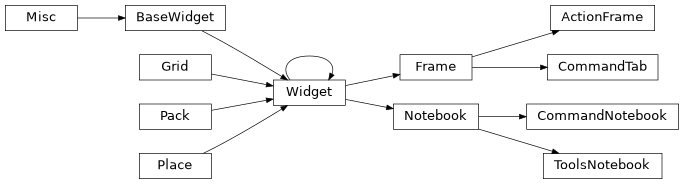
lib.gui.command Module
The command frame for Faceswap GUI
- class lib.gui.command.ActionFrame(parent)
Action Frame - Displays action controls for the command tab
- add_action_button(category, actionbtns)
Add the action buttons for page
- class lib.gui.command.CommandNotebook(parent)
Frame to hold each individual tab of the command notebook
- build_tabs()
Build the tabs for the relevant command
- change_action_button(*args)
Change the action button to relevant control
- set_running_task_trace()
Set trigger action for the running task to change the action buttons text and command
- property tab_names
Command tab titles with their IDs
- Type:
dict
- property tools_tab_names
Tools tab titles with their IDs
- Type:
dict
- class lib.gui.command.CommandTab(parent, category, command)
Frame to hold each individual tab of the command notebook
- add_frame_separator()
Add a separator between top and bottom frames
- build_tab()
Build the tab
- class lib.gui.command.ToolsNotebook(parent)
Tools sit in their own tab, but need to inherit objects from the main command notebook
Classes
|
Action Frame - Displays action controls for the command tab |
|
Frame to hold each individual tab of the command notebook |
|
Frame to hold each individual tab of the command notebook |
|
Tools sit in their own tab, but need to inherit objects from the main command notebook |
Class Inheritance Diagram
lib.gui.control_helper Module
Helper functions and classes for GUI controls
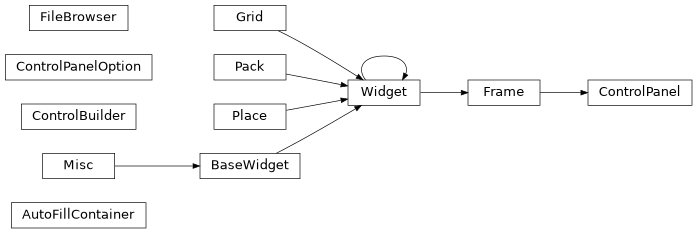
- class lib.gui.control_helper.AutoFillContainer(parent, initial_columns, max_columns, style='')
A container object that auto-fills columns.
- Parameters:
parent (
ttk.Frame) – The parent widget that holds this containerinitial_columns (int) – The initial number of columns that this container should display
max_columns (int) – The maximum number of column that this container is permitted to display
style (str, optional) – The name of the style to use for the control panel. Styles are configured when TkInter initializes. The style name is the common prefix prior to the widget name. Default: empty string (use the OS style)
- compile_widget_config()
Compile all children recursively in correct order if not already compiled and add to
_widget_config
- static config_cleaner(widget)
Some options don’t like to be copied, so this returns a cleaned configuration from a widget We use config() instead of configure() because some items (ttk Scale) do not populate configure()
- destroy_children()
Destroy the currently existing widgets
- get_all_children_config(widget, child_list)
Return all children, recursively, of given widget.
- Parameters:
widget (tkinter widget) – The widget to recursively obtain the configurations of each child
child_list (list) – The list of child configurations already collected
- Returns:
The list of configurations for all recursive children of the given widget
- Return type:
list
- property items
Returns the number of items held in this container
- static pack_config_cleaner(widget)
Some options don’t like to be copied, so this returns a cleaned configuration from a widget
- pack_widget_clones(widget_dicts, old_children=None, new_children=None)
Recursively pass through the list of widgets creating clones and packing all children.
Widgets cannot be given a new parent so we need to clone them and then pack the new widgets.
- Parameters:
widget_dicts (list) – List of dictionaries, in appearance order, of widget information for cloning widgets
old_childen (list, optional) – Used for recursion. Leave at
Nonenew_childen (list, optional) – Used for recursion. Leave at
None
- rearrange_columns(width)
On column number change redistribute widgets
- repack_columns()
Repack or unpack columns based on display columns
- static scale_column_width(original_size, original_fontsize)
Scale the column width based on selected font size
- set_subframes()
Set a sub-frame for each possible column
- property subframe
Returns the next sub-frame to be populated
- validate(width)
Validate that passed in width should trigger column re-arranging
- class lib.gui.control_helper.ControlBuilder(parent, option, option_columns, label_width, checkbuttons_frame, style, blank_nones)
Builds and returns a frame containing a tkinter control with label This should only be called from the ControlPanel class
- Parameters:
parent (tkinter object) – Parent tkinter object
option (ControlPanelOption object) – Holds all of the required option information
option_columns (int) – Number of options to put on a single row for check-buttons/radio-buttons
label_width (int) – Sets the width of the control label
checkbuttons_frame (tkinter.frame) – If a check-button frame is passed in, then check-buttons will be placed in this frame rather than the main options frame
style (str) – The name of the style to use for the control panel. Styles are configured when TkInter initializes. The style name is the common prefix prior to the widget name. Provide an empty string to use the OS style
blank_nones (bool) – Sets selected values to an empty string rather than None if this is true.
- build_control()
Build the correct control type for the option passed through
- build_control_label()
Label for control
- build_one_control()
Build and place the option controls
- control_frame(parent)
Frame to hold control and it’s label
- control_to_checkframe()
Add check-buttons to the check-button frame
- control_to_optionsframe()
Standard non-check buttons sit in the main options frame
- set_tk_var(blank_nones)
Correct variable type for control
- static slider_check_float(value)
Validate a slider’s text entry box for float values. :param value: The slider text entry value to validate :type value: str
- static slider_check_int(value)
Validate a slider’s text entry box for integer values.
- Parameters:
value (str) – The slider text entry value to validate
- slider_control()
A slider control with corresponding Entry box
- class lib.gui.control_helper.ControlPanel(parent, options, label_width=20, columns=1, max_columns=4, option_columns=4, header_text=None, style=None, blank_nones=True, scrollbar=True)
A Control Panel to hold control panel options. This class handles all of the formatting, placing and TK_Variables in a consistent manner.
It can also provide dynamic columns for resizing widgets
- Parameters:
parent (tkinter object) – Parent widget that should hold this control panel
options (list of ControlPanelOptions objects) – The list of controls that are to be built into this control panel
label_width (int, optional) – The width that labels for controls should be set to. Defaults to 20
columns (int, optional) – The initial number of columns to set the layout for. Default: 1
max_columns (int, optional) – The maximum number of columns that this control panel should be able to accommodate. Setting to 1 means that there will only be 1 column regardless of how wide the control panel is. Higher numbers will dynamically fill extra columns if space permits. Defaults to 4
option_columns (int, optional) – For check-button and radio-button containers, how many options should be displayed on each row. Defaults to 4
header_text (str, optional) – If provided, will place an information box at the top of the control panel with these contents.
style (str, optional) – The name of the style to use for the control panel. Styles are configured when TkInter initializes. The style name is the common prefix prior to the widget name. Default:
None(use the OS style)blank_nones (bool, optional) – How the control panel should handle None values. If set to True then None values will be converted to empty strings. Default: False
scrollbar (bool, optional) –
Trueif a scrollbar should be added to the control panel, otherwiseFalse. Default:True
- add_info(frame)
Plugin information
- add_scrollbar()
Add a scrollbar to the options frame
- build_panel(blank_nones, scrollbar)
Build the options frame for this command
- checkbuttons_frame(frame)
Build and format frame for holding the check buttons if is_master then check buttons will be placed in a LabelFrame otherwise in a standard frame
- get_group_frame(group)
Return a group frame.
If a group frame has already been created for the given group, then it will be returned, otherwise it will be created and returned.
- Parameters:
group (str) – The name of the group to obtain the group frame for
- Returns:
If this is a ‘master’ group frame then returns a standard frame. If this is any other group, then will return the ToggledFrame for that group
- Return type:
ttk.FrameorToggledFrame
- get_opts_frame()
Return an auto-fill container for the options inside a main frame
- resize_frame(event)
Resize the options frame to fit the canvas
- update_scrollbar(event)
Update the options frame scrollbar
- class lib.gui.control_helper.ControlPanelOption(title: str, dtype: type, group: str | None = None, subgroup: str | None = None, default: str | bool | float | int | None = None, initial_value: str | bool | float | int | None = None, choices: list[str] | tuple[str, ...] | Literal['colorchooser'] | None = None, is_radio: bool = False, is_multi_option: bool = False, rounding: int | float | None = None, min_max: tuple[int, int] | tuple[float, float] | None = None, sysbrowser: dict[Literal['filetypes', 'browser', 'command', 'destination', 'action_option'], str | list[str]] | None = None, helptext: str | None = None, track_modified: bool = False, command: str | None = None)
A class to hold a control panel option. A list of these is expected to be passed to the ControlPanel object.
- Parameters:
title (str) – Title of the control. Will be used for label text and control naming
dtype (type) – Datatype of the control.
group (str | None, optional) – The group that this control should sit with. If provided, all controls in the same group will be placed together. Default:
Nonesubgroup (str | None, optional) – The subgroup that this option belongs to. If provided, will group options in the same subgroups together for the same layout as option/check boxes. Default:
Nonedefault (str | bool | float | int | list[str] | None, optional) – Default value for the control. If None is provided, then action will be dictated by whether “blank_nones” is set in ControlPanel. Default:
Noneinitial_value (str | bool | float | int | list[str] | None, optional) – Initial value for the control. If
None, default will be used. Default:Nonechoices (list[str] | tuple[str, ...] | Literal["colorchooser"] | None, optional) – Used for combo boxes and radio control option setting. Set to “colorchooser” for a color selection dialog. Default:
Noneis_radio (bool, optional) – Specifies to use a Radio control instead of combobox if choices are passed. Default:
Falseis_multi_option (bool, optional) – Specifies to use a Multi Check Button option group for the specified control. Default:
Falserounding (int | float | None, optional) – For slider controls. Sets the stepping. Default:
Nonemin_max (tuple[int, int] | tuple[float, float] | None, optional) – For slider controls. Sets the min and max values. Default:
Nonesysbrowser (dict[Literal["filetypes", "browser", "command", "destination", "action_option"], str | list[str]] | None, optional) – Adds Filesystem browser buttons to ttk.Entry options. Default:
Nonehelptext (str | None, optional) – Sets the tooltip text. Default:
Nonetrack_modified (bool, optional) – Set whether to set a callback trace indicating that the parameter has been modified. Default:
Falsecommand (str | None, optional) – Required if tracking modified. The command that this option belongs to. Default:
None
- property choices: list[str] | tuple[str, ...] | Literal['colorchooser'] | None
The option choices
- Type:
list[str] | tuple[str, …] | Literal[“colorchooser”]
- property default: str | bool | float | int | None
Either the currently selected value or the default
- Type:
str | bool | float | int | list[str]
- classmethod from_config_object(title: str, option: ConfigItem) Self
Create a GUI control panel option from a Faceswap ConfigItem
- Parameters:
title (str) – The option title (that displays as a label in the GUI)
option (
ConfigItem) – The faceswap object to create the Control Panel option from
- Returns:
A GUI ControlPanelOption instance
- Return type:
- get() str | bool | int | float
Return the option value from the tk_var
- Returns:
The value selected for this option
- Return type:
str | bool | float | int
Notes
tk variables don’t like empty values if it’s not a stringVar. This seems to be pretty much the only reason that a get() call would fail, so replace any numerical variable with it’s numerical zero equivalent on a TCL Error. Only impacts variables linked to Entry widgets.
- get_control() Literal['radio', 'multi', 'colorchooser', 'scale'] | type[Combobox] | type[Checkbutton] | type[Entry]
Set the correct control type based on the datatype or for this option
- Return type:
Literal[‘radio’, ‘multi’, ‘colorchooser’, ‘scale’] | type[~tkinter.ttk.Combobox] | type[~tkinter.ttk.Checkbutton] | type[~tkinter.Entry]
- get_tk_var(initial_value: str | bool | int | float) Variable
Correct variable type for control
- Parameters:
value (initial) – The initial value to set the tk.Variable to
initial_value (str | bool | int | float)
- Returns:
The correct tk.Variable for the given initial value
- Return type:
tk.BooleanVar|tk.IntVar|tk.DoubleVar|tk.StringVar
- property group: str
Option group or “_master” if no group set
- Type:
str
- property helptext: str | None
The formatted option help text for tooltips
- Type:
str | None
- property is_multi_option: bool
Trueif the control should be contained in a multi check button group, otherwiseFalse.- Type:
bool
- property is_radio: bool
If the option should be a radio control
- Type:
bool
- property min_max: tuple[int, int] | tuple[float, float] | None
minimum and maximum values for numeric controls
- Type:
tuple[int, int] | tuple[float, float] | None
- property name: str
Lowered title for naming
- Type:
str
- property rounding: int | float | None
Rounding for numeric controls
- Type:
int | float | None
- set(value: str | bool | int | float | None) None
Set the variable for the config option with the given value
- Parameters:
value (str | bool | float | int | None) – The value to set the config option variable to
- Return type:
None
- set_initial_value(value: str | bool | int | float)
Set the initial_value to the given value
- Parameters:
value (str | bool | int | float) – The value to set the initial value attribute to
- property subgroup: str | None
Option subgroup, or
Noneif none provided.- Type:
str | None
- property title
Title case title for naming with underscores removed
- Type:
str
- property value: str | bool | float | int | None
Either the initial value or default
- Type:
str | bool | float | int | list[str]
- class lib.gui.control_helper.FileBrowser(opt_name, tk_var, control_frame, sysbrowser_dict, style)
Add FileBrowser buttons to control and handle routing
- add_browser_buttons()
Add correct file browser button for control
- ask_context(filepath, filetypes)
Method to pop the correct dialog depending on context
- static ask_folder(filepath, filetypes=None)
Pop-up to get path to a directory :param filepath: tkinter StringVar object that will store the path to a directory. :param filetypes: Unused argument to allow filetypes to be given in ask_load().
- static ask_load(filepath, filetypes)
Pop-up to get path to a file
- static ask_multi_load(filepath, filetypes)
Pop-up to get path to a file
- static ask_nothing(filepath, filetypes=None)
Method that does nothing, used for disabling open/save pop up
- static ask_save(filepath, filetypes=None)
Pop-up to get path to save a new file
- static format_action_option(action_option)
Format the action option to remove any dashes at the start
- property helptext
Dict containing tooltip text for buttons
- set_context_action_option(options)
Set the tk_var for the source action option that dictates the context sensitive file browser.
- lib.gui.control_helper.set_slider_rounding(value, var, d_type, round_to, min_max)
Set the value of sliders underlying variable based on their datatype, rounding value and min/max.
- Parameters:
var (tkinter.Var) – The variable to set the value for
d_type ([
int,float]) – The type of value that is stored invarround_to (int or list) – If
d_typeisfloatthen this is the decimal place rounding forvar. Ifd_typeisintthen this is the number of steps between each increment forvar. If a list is provided, then this must be a list of discreet values that are of the correctd_type.min_max (tuple (int, int)) – The (
min,max) values that this slider accepts
Functions
|
Set the value of sliders underlying variable based on their datatype, rounding value and min/max. |
Classes
|
A container object that auto-fills columns. |
|
Builds and returns a frame containing a tkinter control with label This should only be called from the ControlPanel class |
|
A Control Panel to hold control panel options. |
|
A class to hold a control panel option. |
|
Add FileBrowser buttons to control and handle routing |
Class Inheritance Diagram
lib.gui.custom_widgets Module
Custom widgets for Faceswap GUI
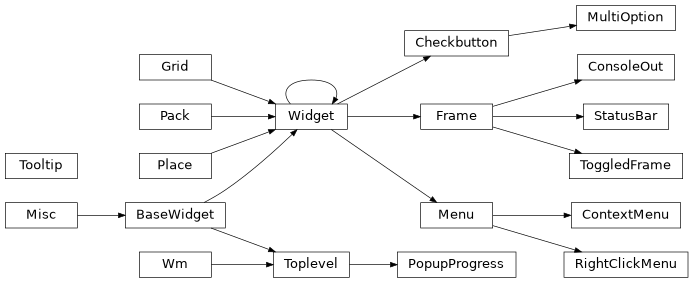
- class lib.gui.custom_widgets.ConsoleOut(parent, debug)
The Console out section of the GUI.
A Read only text box for displaying the output from stdout/stderr.
All handling is internal to this method. To clear the console, the stored tkinter variable in
tk_varsconsole_clearshould be triggered.- Parameters:
parent (tkinter object) – The Console’s parent widget
debug (bool) –
Trueif console output should not be directed to this widget otherwiseFalse
- class lib.gui.custom_widgets.ContextMenu(widget)
A Pop up menu to be triggered when right clicking on widgets that this menu has been applied to.
This widget provides a simple right click pop up menu to the widget passed in with Cut, Copy, Paste and Select all menu items.
- Parameters:
widget (tkinter object) – The widget to apply the
ContextMenuto
Example
>>> text_box = ttk.Entry(parent)
>>> text_box.pack()
>>> right_click_menu = ContextMenu(text_box)
>>> right_click_menu.cm_bind()
- cm_bind()
Bind the menu to the given widgets Right Click event
After associating a widget with this
ContextMenuthis function should be called to bind it to the right click button
- class lib.gui.custom_widgets.MultiOption(parent, value, variable, **kwargs)
Similar to the standard
ttk.Radiowidget, but with the ability to select multiple pre-defined options. Selected options are generated as nargs for the argument parser to consume.- Parameters:
parent (
ttk.Frame) – The tkinter parent widget for the check buttonvalue (str) – The raw option value for this check button
variable (
tkinter.StingVar) – The master variable for the group of check buttons that this check button will belong to. The output of this variable will be a string containing a space separated list of the selected check button options
- class lib.gui.custom_widgets.PopupProgress(title, total)
A simple pop up progress bar that appears of the center of the root window.
When this is called, the root will be disabled until the
close()method is called.- Parameters:
title (str) – The title to appear above the progress bar
total (int or float) – The total count of items for the progress bar
Example
>>> total = 100
>>> progress = PopupProgress("My title...", total)
>>> for i in range(total):
>>>     progress.update(1)
>>> progress.close()
- property progress_bar
The progress bar object within the pop up window.
- Type:
tkinter.ttk.Progressbar
- step(amount)
Increment the progress bar.
- Parameters:
amount (int or float) – The amount to increment the progress bar by
- stop()
Stop the progress bar, re-enable the root window and destroy the pop up window.
- update_title(title)
Update the title that displays above the progress bar.
- Parameters:
title (str) – The title to appear above the progress bar
- class lib.gui.custom_widgets.RightClickMenu(labels, actions, hotkeys=None)
A Pop up menu that can be bound to a right click mouse event to bring up a context menu
- Parameters:
labels (list) – A list of label titles that will appear in the right click menu
actions (list) – A list of python functions that are called when the corresponding label is clicked on
hotkeys (list, optional) – The hotkeys corresponding to the labels. If using hotkeys, then there must be an entry in the list for every label even if they don’t all use hotkeys. Labels without a hotkey can be an empty string or
None. PassingNoneinstead of a list means that no actions will be given hotkeys. NB: The hotkey is not bound by this class, that needs to be done in code. Giving hotkeys here means that they will be displayed in the menu though. Default:None
- popup(event)
Pop up the right click menu.
- Parameters:
event (class:tkinter.Event) – The tkinter mouse event calling this popup
- class lib.gui.custom_widgets.StatusBar(parent: Frame, hide_status: bool = False)
Status Bar for displaying the Status Message and Progress Bar at the bottom of the GUI.
- Parameters:
parent (tkinter object) – The parent tkinter widget that will hold the status bar
hide_status (bool, optional) –
Trueto hide the status message that appears at the far left hand side of the status frame otherwiseFalse. Default:False
- property message: StringVar
The variable to hold the status bar message on the left hand side of the status bar.
- Type:
tkinter.StringVar
- progress_update(message: str, position: int, update_position: bool = True) None
Update the GUIs progress bar and position.
- Parameters:
message (str) – The message to display next to the progress bar
position (int) – The position that the progress bar should be set to
update_position (bool, optional) – If
Truethen the progress bar will be updated to the position given inposition. IfFalsethe progress bar will not be updates. Default:True
- Return type:
None
- set_mode(mode: Literal['indeterminate', 'determinate']) None
Set the mode of a currently displayed progress bar and reset position to 0.
If the given mode is the same as the currently configured mode, returns without performing any action.
- Parameters:
mode (["indeterminate", "determinate"]) – The mode that the progress bar should be set to
- Return type:
None
- start(mode: Literal['indeterminate', 'determinate']) None
Set progress bar mode and display,
- Parameters:
mode (["indeterminate", "determinate"]) – The mode that the progress bar should be executed in
- Return type:
None
- stop() None
Reset progress bar and hide
- Return type:
None
- class lib.gui.custom_widgets.ToggledFrame(parent, *args, text='', theme='CPanel', toggle_var=None, **kwargs)
A collapsible and expandable frame.
The frame contains a header given in the text argument, and adds an expand contract button. Clicking on the header will expand and contract the sub-frame below
- Parameters:
text (str) – The text to appear in the Toggle Frame header
theme (str, optional) – The theme to use for the panel header. Default: “CPanel”
subframe_style (str, optional) – The name of the ttk Style to use for the sub frame. Default:
Nonetoggle_var (
tk.BooleanVar, optional) – If provided, this variable will control the expanded (True) and minimized (False) state of the widget. Set to None to create the variable internally. Default:None
- property is_expanded
Trueif the Toggle Frame is expanded.Falseif it is minimized.- Type:
bool
- class lib.gui.custom_widgets.Tooltip(widget, *, pad=(5, 3, 5, 3), text='widget info', text_variable=None, wait_time=400, wrap_length=250)
Create a tooltip for a given widget as the mouse goes on it.
- Parameters:
widget (tkinter object) – The widget to apply the tool-tip to
pad (tuple, optional) – (left, top, right, bottom) padding for the tool-tip. Default: (5, 3, 5, 3)
text (str, optional) – The text to be displayed in the tool-tip. Default: ‘widget info’
text_variable (
tkinter.strVar, optional) – The text variable to use for dynamic help text. Appended after the contents oftextif provided. Default:Nonewait_time (int, optional) – The time in milliseconds to wait before showing the tool-tip. Default: 400
wrap_length (int, optional) – The text length for each line before wrapping. Default: 250
Example
>>> button = ttk.Button(parent, text="Exit")
>>> Tooltip(button, text="Click to exit")
>>> button.pack()
Notes
Adapted from StackOverflow: http://stackoverflow.com/questions/3221956 and http://www.daniweb.com/programming/software-development/code/484591/a-tooltip-class-for-tkinter
Classes
|
The Console out section of the GUI. |
|
A Pop up menu to be triggered when right clicking on widgets that this menu has been applied to. |
|
Similar to the standard |
|
A simple pop up progress bar that appears of the center of the root window. |
|
A Pop up menu that can be bound to a right click mouse event to bring up a context menu |
|
Status Bar for displaying the Status Message and Progress Bar at the bottom of the GUI. |
|
A collapsible and expandable frame. |
|
Create a tooltip for a given widget as the mouse goes on it. |
Class Inheritance Diagram
lib.gui.display Module
Display Frame of the Faceswap GUI
This is the large right hand area of the GUI. At default, the Analysis tab is always displayed here. Further optional tabs will also be displayed depending on the currently executing Faceswap task.
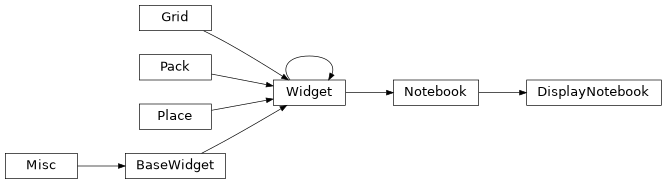
- class lib.gui.display.DisplayNotebook(parent)
The tkinter Notebook that holds the display items.
- Parameters:
parent (
tk.PanedWindow) – The paned window that holds the Display Notebook
- property running_task
The global tkinter variable that indicates whether a Faceswap task is currently running or not.
- Type:
tkinter.BooleanVar
Classes
|
The tkinter Notebook that holds the display items. |
Class Inheritance Diagram
lib.gui.display_analysis Module
Analysis tab of Display Frame of the Faceswap GUI
- class lib.gui.display_analysis.Analysis(parent, tab_name, helptext)
Session Analysis Tab.
The area of the GUI that holds the session summary stats for model training sessions.
- Parameters:
parent (
lib.gui.display.DisplayNotebook) – Thettk.Notebookthat holds this session summary statistics pagetab_name (str) – The name of the tab to be displayed in the notebook
helptext (str) – The help text to display for the summary statistics page
- on_tab_select()
Callback for when the analysis tab is selected.
Update the statistics with the latest values.
- set_vars()
Set the analysis specific tkinter variables to
vars.- The tracked variables are the global variables that:
Trigger when a graph refresh has been requested.
Trigger training is commenced or halted
The variable holding the location of the current Tensorboard log folder.
- Returns:
The dictionary of variable names to tkinter variables
- Return type:
dict
- class lib.gui.display_analysis.StatsData(parent, selected_id, helptext)
Stats frame of analysis tab.
Holds the tree-view containing the summarized session statistics in the Analysis tab.
- Parameters:
parent (
tkinter.Frame) – The frame within the Analysis Notebook that will hold the statisticsselected_id (
tkinter.IntVar) – The tkinter variable that holds the currently selected session IDhelptext (str) – The help text to display for the summary statistics page
- tree_clear()
Clear all of the summary data from the tree-view.
- tree_insert_data(sessions_summary)
Insert the summary data into the statistics tree-view.
- Parameters:
sessions_summary (list) – List of session summary dicts for populating into the tree-view
Classes
|
Session Analysis Tab. |
|
Stats frame of analysis tab. |
Class Inheritance Diagram
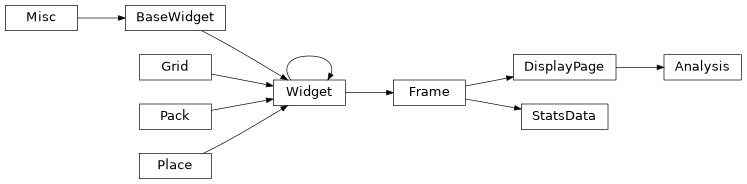
lib.gui.display_command Module
Command specific tabs of Display Frame of the Faceswap GUI
- class lib.gui.display_command.GraphDisplay(parent: Notebook, tab_name: str, helptext: str, wait_time: int, command: str | None = None)
The Graph Tab of the Display section
- Parameters:
parent (Notebook)
tab_name (str)
helptext (str)
wait_time (int)
command (str | None)
- add_child(name: str, data: Calculations) None
Add the graph for the selected keys.
- Parameters:
name (str) – The name of the graph to add to the notebook
data (
Calculations) – The object holding the data to be graphed
- Return type:
None
- add_options() None
Add the additional options
- Return type:
None
- close() None
Clear the plots from RAM
- Return type:
None
- display_item_process() None
Add a single graph to the graph window
- Return type:
None
- display_item_set() None
Load the graph(s) if available
- Return type:
None
- on_tab_select() None
Callback for when the graph tab is selected.
Pull latest data and run the tab’s update code when the tab is selected.
- Return type:
None
- save_items() None
Open save dialogue and save graphs
- Return type:
None
- set_vars() None
Add graphing specific variables to the default variables.
Overrides original method.
- Returns:
The variable names with their corresponding tkinter variable
- Return type:
dict
- class lib.gui.display_command.PreviewExtract(*args, **kwargs)
Tab to display output preview images for extract and convert
- add_child() None
Add the preview label child
- Return type:
None
- display_item_process() None
Display the preview
- Return type:
None
- display_item_set() None
Load the latest preview if available
- Return type:
None
- save_items() None
Open save dialogue and save preview
- Return type:
None
- update_child() None
Update the preview image on the label
- Return type:
None
- class lib.gui.display_command.PreviewTrain(*args, **kwargs)
Training preview image(s)
- add_options() None
Add the additional options
- Return type:
None
- display_item_process() None
Display the preview(s) resized as appropriate
- Return type:
None
- display_item_set() None
Load the latest preview if available
- Return type:
None
- save_items() None
Open save dialogue and save preview
- Return type:
None
- subnotebook_hide() None
Override default subnotebook hide action to also remove the embedded option bar control and reset the training image buffer
- Return type:
None
Classes
|
The Graph Tab of the Display section |
|
Tab to display output preview images for extract and convert |
|
Training preview image(s) |
Class Inheritance Diagram

lib.gui.display_graph Module
Graph functions for Display Frame area of the Faceswap GUI
- class lib.gui.display_graph.GraphBase(parent, data, ylabel: str)
Base class for matplotlib line graphs.
- Parameters:
parent – The parent frame that holds the graph
data – The statistics class that holds the data to be displayed
ylabel (str) – The data label for the y-axis
- property calcs
The calculated statistics associated with this graph.
- clear() None
Clear the graph plots from RAM
- Return type:
None
Overrides the default Navigation Toolbar to provide only the buttons we require and to layout the items in a consistent manner with the rest of the GUI for the Analysis Session Graph pop up Window.
- Parameters:
canvas (FigureCanvasTkAgg) – The canvas that holds the displayed graph and will hold the toolbar
window – The Session Graph canvas
pack_toolbar (bool) – Whether to pack the Tool bar or not. Default:
True
- class lib.gui.display_graph.SessionGraph(parent, data, ylabel: str, scale: str)
Session Graph for session pop-up.
- Parameters:
parent – The parent frame that holds the graph
data – The statistics class that holds the data to be displayed
ylabel (str) – The data label for the y-axis
scale (str) – Should be one of
"log"or"linear"
- build() None
Build the session graph
- Return type:
None
- refresh(data, ylabel: str, scale: str) None
Refresh the Session Graph’s data.
- Parameters:
data – The statistics class that holds the data to be displayed
ylabel (str) – The data label for the y-axis
scale (str) – Should be one of
"log"or"linear"
- Return type:
None
- set_yscale_type(scale: str) None
Set the scale type for the y-axis and redraw.
- Parameters:
scale (str) – Should be one of
"log"or"linear"- Return type:
None
- class lib.gui.display_graph.TrainingGraph(parent, data, ylabel: str)
Live graph to be displayed during training.
- Parameters:
parent – The parent frame that holds the graph
data – The statistics class that holds the data to be displayed
ylabel (str) – The data label for the y-axis
- build() None
Build the Training graph.
- Return type:
None
- refresh(*args) None
Read the latest loss data and apply to current graph
- Return type:
None
- save_fig(location: str) None
Save the current graph to file
- Parameters:
location (str) – The full path to the folder where the current graph should be saved
- Return type:
None
Classes
|
Base class for matplotlib line graphs. |
|
Overrides the default Navigation Toolbar to provide only the buttons we require and to layout the items in a consistent manner with the rest of the GUI for the Analysis Session Graph pop up Window. |
|
Session Graph for session pop-up. |
|
Live graph to be displayed during training. |
Class Inheritance Diagram

lib.gui.display_page Module
Display Page parent classes for display section of the Faceswap GUI
- class lib.gui.display_page.DisplayOptionalPage(parent, tab_name, helptext, wait_time, command=None)
Parent Context Sensitive Display Tab
- add_option_enable()
Add check-button to enable/disable page
- add_option_save()
Add save button to save page output to file
- add_options()
Add the additional options
- close()
Called when the parent notebook is shutting down Children must be destroyed as forget only hides display Override for page specific shutdown
- display_item_process()
Override for display specific loading
- display_item_set()
Override for display specific loading
- load_display()
Load the display
- on_chkenable_change()
Update the display immediately on a check-button change
- on_tab_select()
Callback for when the optional tab is selected.
Run the tab’s update code when the tab is selected.
- save_items()
Save items. Override for display specific saving
- set_info_text()
Set waiting for display text
- set_vars()
Analysis specific vars
- class lib.gui.display_page.DisplayPage(parent, tab_name, helptext)
Parent frame holder for each tab. Defines uniform structure for each tab to inherit from
- add_frame_separator()
Add a separator between top and bottom frames
- add_optional_vars(varsdict)
Add page specific variables
- add_options_frame()
Add the display tab options
- add_options_info()
Add the info bar
- add_subnotebook()
Add the main frame notebook
- on_tab_select()
Override for specific actions when the current tab is selected
- set_info(msg)
Set the info message
- static set_mainframe_single_tab_style()
Configure ttk notebook style to represent a single frame
- set_vars()
Override to return a dict of page specific variables
- subnotebook_add_page(tabtitle, widget=None)
Add a page to the sub notebook
- subnotebook_configure()
Configure notebook to display or hide tabs
- subnotebook_get_titles_ids()
Return tabs ids and titles
- subnotebook_get_widgets()
Return each widget that sits within each subnotebook frame
- subnotebook_hide()
Hide the subnotebook. Used for hiding Optional displays
- subnotebook_page_from_id(tab_id)
Return subnotebook tab widget from it’s ID
- subnotebook_show()
Show subnotebook. Used for displaying Optional displays
Classes
|
Parent Context Sensitive Display Tab |
|
Parent frame holder for each tab. |
Class Inheritance Diagram
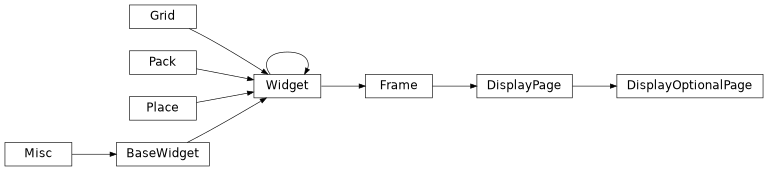
lib.gui.menu Module
The Menu Bars for faceswap GUI
File menu items and functions
- Parameters:
parent (
tkinter.Menu) – The main menu bar to hold this menu item
Help menu items and functions
- Parameters:
parent (
tkinter.Menu) – The main menu bar to hold this menu item
GUI Main Menu Bar
- Parameters:
master (
tkinter.Tk) – The root tkinter object
Settings menu items and functions
- Parameters:
parent (
tkinter.Menu) – The main menu bar to hold this menu item
Task bar buttons
- Parameters:
parent (
tkinter.ttk.Frame) – The frame that holds the task bar
Classes
|
File menu items and functions |
|
Help menu items and functions |
|
GUI Main Menu Bar |
|
Settings menu items and functions |
|
Task bar buttons |
Class Inheritance Diagram
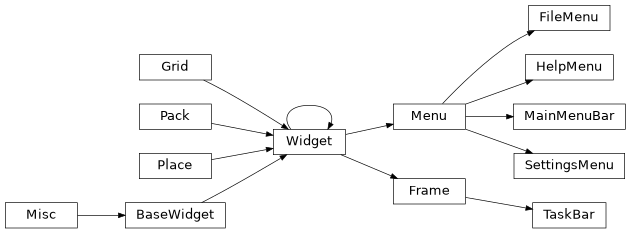
lib.gui.options Module
Cli Options for the GUI
- class lib.gui.options.CliOption(panel_option: ControlPanelOption, opts: tuple[str, ...], nargs: Literal['+'] | None)
A parsed command line option
- Parameters:
panel_option (
ControlPanelOption:) – Object to hold information of a command line item for displaying in a GUIControlPanelopts (tuple[str, ...]:) – The short switch and long name (if exists) of the command line option
nargs (Literal["+"] | None:) –
Nonefor not used. “+” for at least 1 argument required with values to be contained in a list
- nargs: Literal['+'] | None = <dataclasses._MISSING_TYPE object>
Nonefor not used. “+” for at least 1 argument required with values to be contained in a list- Type:
Literal[“+”] | None
- opts: tuple[str, ...] = <dataclasses._MISSING_TYPE object>
The short switch and long name (if exists) of cli option
- Type:
tuple[str, …]
- panel_option: ControlPanelOption = <dataclasses._MISSING_TYPE object>
Object to hold information of a command line item for displaying in a GUI
ControlPanel- Type:
- class lib.gui.options.CliOptions
Class and methods for the command line options
- property categories: tuple[Literal['faceswap', 'tools'], ...]
tuple[str, str] The categories for faceswap’s GUI
- clear(command: str | None = None) None
Clear the options values for all or passed commands
- Parameters:
command (str | None, optional) – The command to clear the options for.
Noneto clear options for all commands. Default:None- Return type:
None
- property commands: dict[Literal['faceswap', 'tools'], list[str]]
dict[str, ]
- gen_cli_arguments(command: str) Generator[tuple[str, ...], None, None]
Yield the generated cli arguments for the selected command
- Parameters:
command (str) – The command to generate the command line arguments for
- Yields:
tuple[str, …] – The generated command line arguments
- Return type:
Generator[tuple[str, …], None, None]
- get_one_option_variable(command: str, title: str) Variable | None
Return a single
tkinter.Variabletk_var for the specified command and control_title- Parameters:
command (str) – The command to return the variable from
title (str) – The option title to return the variable for
- Returns:
The requested tkinter variable, or
Noneif it could not be found- Return type:
tkinter.Variable| None
- get_option_values(command: str | None = None) dict[str, dict[str, bool | int | float | str]]
Return all or single command control titles with the associated tk_var value
- Parameters:
command (str | None, optional) – The command to get the option values for.
Noneto get all option values. Default:None- Returns:
option values in the format {command: {option_name: option_value}}
- Return type:
dict[str, dict[str, bool | int | float | str]]
- property opts: dict[str, dict[str, CliOption | str]]
dict[str, dict[str, CliOption | str]] The command line options collected from faceswap’s cli files
- reset(command: str | None = None) None
Reset the options for all or passed command back to default value
- Parameters:
command (str | None, optional) – The command to reset the options for.
Noneto reset for all commands. Default:None- Return type:
None
Classes
|
A parsed command line option |
Class and methods for the command line options |
lib.gui.popup_configure Module
The pop-up window of the Faceswap GUI for the setting of configuration options.
- class lib.gui.popup_configure.DisplayArea(top_level: Toplevel, parent: Frame, tree: Treeview, theme: dict[str, Any])
The option configuration area of the pop up options.
- Parameters:
top_level (:class:
tk.Toplevel) – The tkinter Top Level widgetparent (
tkinter.ttk.Frame) – The parent frame that holds the Display Area of the pop up configuration windowtree (
tkinter.ttk.Treeview) – The Tree View navigator for the pop up configuration windowtheme (dict[str, Any]) – The color mapping for the settings pop-up theme
- property config_dict: dict[str, dict[str, str | dict[str, ControlPanelOption]]]
The configuration dictionary for all display pages.
- Type:
dict[str, dict[str, str | dict[str, ControlPanelOption]]]
- property displayed_key: str | None
The current display page’s lookup key for configuration options.
- Type:
str
- reset(page_only: bool = False) None
Reset all configuration options to their default values.
- Parameters:
page_only (bool, optional) –
Trueresets just the currently selected page’s options to default,Falseresets all plugins within the currently selected config to default. Default:False- Return type:
None
- save(page_only: bool = False) None
Save the configuration file to disk.
- Parameters:
page_only (bool, optional) –
Truesaves just the currently selected page’s options,Falsesaves all the plugins options within the currently selected config. Default:False- Return type:
None
- select_options(section: str, subsections: list[str]) None
Display the page for the given section and subsections.
- Parameters:
section (str) – The main section to be navigated to (or root node)
subsections (list[str]) – The full list of subsections ending on the required node
- Return type:
None
- lib.gui.popup_configure.open_popup(name: str | None = None) None
Launch the popup, ensuring only one instance is ever open
- Parameters:
name (str | None, Optional) – The name of the configuration file. Used for selecting the correct section if required. Set to
Noneif no initial section should be selected. Default:None- Return type:
None
Functions
|
Launch the popup, ensuring only one instance is ever open |
Classes
|
The option configuration area of the pop up options. |
Class Inheritance Diagram
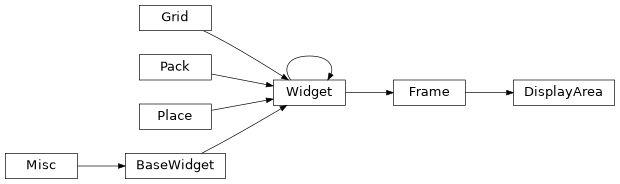
lib.gui.popup_session Module
Pop-up Graph launched from the Analysis tab of the Faceswap GUI
- class lib.gui.popup_session.SessionPopUp(session_id: int, data_points: int)
Pop up for detailed graph/stats for selected session.
- session_id: int or “Total”
The session id number for the selected session from the Analysis tab. Should be the string “Total” if all sessions are being graphed
- data_points: int
The number of iterations in the selected session
- Parameters:
session_id (int)
data_points (int)
- class lib.gui.popup_session.SessionTKVars(buildgraph: BooleanVar, status: StringVar, display: StringVar, scale: StringVar, raw: BooleanVar, trend: BooleanVar, avg: BooleanVar, smoothed: BooleanVar, outliers: BooleanVar, avgiterations: IntVar, smoothamount: DoubleVar, loss_keys: dict[str, ~tkinter.BooleanVar]=<factory>)
Dataclass for holding the tk variables required for the session popup
- Parameters:
buildgraph (
tkinter.BooleanVar) – Trigger variable to indicate the graph should be rebuiltstatus (
tkinter.StringVar) – The variable holding the current status of the popup windowdisplay (
tkinter.StringVar) – Variable indicating the type of information to be displayedscale (
tkinter.StringVar) – Variable indicating whether to display as log or linear dataraw (
tkinter.BooleanVar) – Variable to indicate raw data should be displayedtrend (
tkinter.BooleanVar) – Variable to indicate that trend data should be displayedavg (
tkinter.BooleanVar) – Variable to indicate that rolling average data should be displayedsmoothed (
tkinter.BooleanVar) – Variable to indicate that smoothed data should be displayedoutliers (
tkinter.BooleanVar) – Variable to indicate that outliers should be displayedloss_keys (dict) – Dictionary of names to
tkinter.BooleanVarindicating whether specific loss items should be displayedavgiterations (
tkinter.IntVar) – The number of iterations to use for rolling averagesmoothamount (
tkinter.DoubleVar) – The amount of smoothing to apply for smoothed data
Classes
|
Pop up for detailed graph/stats for selected session. |
|
Dataclass for holding the tk variables required for the session popup |
Class Inheritance Diagram

lib.gui.project Module
Handling of Faceswap GUI Projects, Tasks and Last Session
- class lib.gui.project.LastSession(config: Config)
Faceswap Last Session handling.
Faceswap
LastSessionhandles saving the state of the Faceswap GUI at close and reloading the state at launch.Last Session behavior can be configured in
config.gui.ini.- Parameters:
config (Config) – The master GUI config
- ask_load() None
Pop a message box to ask the user if they wish to load their last session.
- Return type:
None
- from_dict(options: dict[str, str | dict[str, bool | int | float | str]]) None
Set the
_optionsproperty based on the given options dictionary and update the GUI to use these values.This function is required for reloading the GUI state when the GUI has been force refreshed on a config change.
- Parameters:
options (dict[str, str | dict[str, bool | int | float | str]]) – The options to set. Should be the output of
to_dict()- Return type:
None
- load() None
Load the last session.
Loads the last saved session options. Checks if a previous project was loaded and whether there have been changes since the last saved version of the project. Sets the display and
ProjectandTaskobjects accordingly.- Return type:
None
- save() None
Save a snapshot of currently set GUI config options.
Called on Faceswap shutdown.
- Return type:
None
- to_dict() dict[str, str | dict[str, bool | int | float | str] | None] | None
Collect the current GUI options and place them in a dict for retrieval or storage.
This function is required for reloading the GUI state when the GUI has been force refreshed on a config change.
- Return type:
The current cli options ready for saving or retrieval by
from_dict()
- class lib.gui.project.Project(config: Config, file_handler: type[FileHandler])
Faceswap
.fswProject File handling.Faceswap projects handle the management of all task tabs in the GUI and updates the main Faceswap title bar with the project name and modified state.
- Parameters:
config (Config) – The master GUI config
file_handler (type[FileHandler]) – A file handler object
- property cli_options: dict[str, dict[str, bool | int | float | str]]
The raw cli options from
_optionswith project fields removed.
- close(*args) None
Clear the current project and set all options to default.
- Parameters:
*args – Unused, but needs to be present for arguments passed by tkinter event handling
- Return type:
None
- confirm_close() bool
Pop a message box to get confirmation that an unsaved project should be closed
- Return type:
Trueif user confirms close,Falseif user cancels close
- property filename: str | None
The currently active project filename.
- load(*args, filename: str | None = None, last_session: bool = False) None
Load a project from a saved
.fswproject file.- Parameters:
*args – Unused, but needs to be present for arguments passed by tkinter event handling
filename (str | None) – If a filename is passed in, This will be used, otherwise a file handler will be launched to select the relevant file.
last_session (bool) –
Trueif the project is being loaded from the last opened sessionFalseif the project is being loaded directly from disk. Default:False
- Return type:
None
- new(*args) None
Create a new project with default options.
Pops a file handler to select location.
- Parameters:
*args – Unused, but needs to be present for arguments passed by tkinter event handling
- Return type:
None
- reload(*args) None
Reset all GUI’s option tabs to their last saved state.
- Parameters:
*args – Unused, but needs to be present for arguments passed by tkinter event handling
- Return type:
None
- save(*args, save_as: bool = False) None
Save the current GUI state to a
.fswproject file.- Parameters:
*args (tuple) – Unused, but needs to be present for arguments passed by tkinter event handling
save_as (bool, optional) – Whether to save to the stored filename, or pop open a file handler to ask for a location. If there is no stored filename, then a file handler will automatically be popped.
- Return type:
None
- set_default_options() None
Set the default options. The Default GUI options are stored on Faceswap startup.
Exposed as the
_default_optionsfor a project cannot be set until after the main Command Tabs have been loaded.- Return type:
None
- set_modified_callback() None
Adds a callback to each of the
_modified_varstkinter variables When one of these variables is changed, triggers_modified_callback()with the command that was changed.This is exposed as the callback can only be added after the main Command Tabs have been drawn, and their options’ initial values have been set.
- Return type:
None
- class lib.gui.project.Tasks(config: Config, file_handler: type[FileHandler])
Faceswap
.fstTask File handling.Faceswap tasks handle the management of each individual task tab in the GUI. Unlike
Projects, Tasks contains all the active tasks currently running, rather than an individual task.- Parameters:
config (Config) – The master GUI config
file_handler (type[FileHandler]) – A file handler object
- add_project_task(filename: str, command: str, options: dict[str, str | dict[str, bool | int | float | str]]) None
Add an individual task from a loaded
Projectto the internal_tasksdict.Project tasks take priority over any other tasks, so the individual tasks from a new project must be placed in the _tasks dict.
- Parameters:
filename (str) – The filename of the session project file
command (str) – The tab that this task’s options belong to
options (dict[str, str | dict[str, bool | int | float | str]]) – The options for this task loaded from the project
- Return type:
None
- clear() None
Reset all GUI options to their default values for the active tab.
- Return type:
None
- clear_tasks() None
Clears all of the stored tasks.
This is required when loading a task stored in a legacy project file, and is only to be called by
Projectwhen a project has been loaded which is in fact a task.- Return type:
None
- load(*args, filename: str | None = None, current_tab: bool = True) None
Load a task into this
Tasksclass.Tasks can be loaded from project
.fswfiles or task.fstfiles, depending on where this function is being called from.- Parameters:
*args – Unused, but needs to be present for arguments passed by tkinter event handling
filename (str | None) – If a filename is passed in, This will be used, otherwise a file handler will be launched to select the relevant file.
current_tab (bool) –
Trueif the task to be loaded must be for the currently selected tab.Falseif loading a task into any tab. If current_tab is True then tasks can be loaded from.fswand.fstfiles, otherwise they can only be loaded from.fstfiles. Default:True
- Return type:
None
- reload() None
Reset currently selected tab GUI options to their last saved state.
- Return type:
None
- save(save_as: bool = False) None
Save the current GUI state for the active tab to a
.fstfaceswap task file.- Parameters:
save_as (bool) – Whether to save to the stored filename, or pop open a file handler to ask for a location. If there is no stored filename, then a file handler will automatically be popped. Default:
False- Return type:
None
Classes
|
Faceswap Last Session handling. |
|
Faceswap |
|
Faceswap |
Class Inheritance Diagram
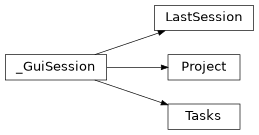
lib.gui.theme Module
functions for implementing themes in Faceswap’s GUI
- class lib.gui.theme.Style(default_font, root, path_cache)
Set the overarching theme and customize widgets.
- Parameters:
default_font (tuple) – The name and size of the default font
root (
tkinter.Tk) – The root tkinter objectpath_cache (str) – The path to the GUI’s cache
- property user_theme
The currently selected user theme.
- Type:
dict
Classes
|
Set the overarching theme and customize widgets. |
lib.gui.wrapper Module
Process wrapper for underlying faceswap commands for the GUI
- class lib.gui.wrapper.FaceswapControl(wrapper: ProcessWrapper)
Control the underlying Faceswap tasks.
- wrapper:
ProcessWrapper The object responsible for managing this faceswap task
- Parameters:
wrapper (ProcessWrapper)
- property command: str | None
The currently executing command, when process running or
None- Type:
str | None
- execute_script(command: str, args: list[str]) None
Execute the requested Faceswap Script
- Parameters:
command (str) – The faceswap command that is to be run
args (list[str]) – The full command line arguments to be executed
- Return type:
None
- terminate() None
Terminate the running process in a LongRunningTask so console can still be updated console
- Return type:
None
- wrapper:
- class lib.gui.wrapper.ProcessWrapper
Builds command, launches and terminates the underlying faceswap process. Updates GUI display depending on state
- property task: FaceswapControl
The object that controls the underlying faceswap process
- Type:
- terminate(message: str) None
Finalize wrapper when process has exited. Stops the progress bar, sets the status message. If the terminating task is ‘train’, then triggers the training close down actions
- Parameters:
message (str) – The message to display in the status bar
- Return type:
None
Classes
|
Control the underlying Faceswap tasks. |
Builds command, launches and terminates the underlying faceswap process. |