lib.image Module
Utilities for working with images
- class lib.image.FacesLoader(path, skip_list=None, count=None)
Loads faces from a faces folder along with the face’s Faceswap metadata.
Examples
Loading faces with their Faceswap metadata:
>>> loader = FacesLoader('/path/to/faces/folder')
>>> for filename, face, metadata in loader.load():
>>>     <do processing>
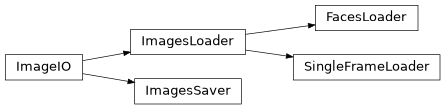
- class lib.image.ImageIO(path, queue_size, args=None)
Perform disk IO for images or videos in a background thread.
This is the parent thread for
ImagesLoaderandImagesSaverand should not be called directly.- Parameters:
path (str or list) – The path to load or save images to/from. For loading this can be a folder which contains images, video file or a list of image files. For saving this must be an existing folder.
queue_size (int) – The amount of images to hold in the internal buffer.
args (tuple, optional) – The arguments to be passed to the loader or saver thread. Default:
None
See also
lib.image.ImagesLoaderBackground Image Loader inheriting from this class.
lib.image.ImagesSaverBackground Image Saver inheriting from this class.
- close()
Closes down and joins the internal threads
- property location
The folder or video that was passed in as the
pathparameter.- Type:
str
- class lib.image.ImagesLoader(path: str | list[str], queue_size: int = 8, fast_count: bool = True, skip_list: list[int] | None = None, count: int | None = None, pts: list[int] | None = None, keyframes: list[int] | None = None)
Perform image loading from a folder of images or a video.
Images will be loaded and returned in the order that they appear in the folder, or in the video to ensure deterministic ordering. Loading occurs in a background thread, caching 8 images at a time so that other processes do not need to wait on disk reads.
See also
ImageIOfor additional attributes.- Parameters:
path (str | list[str]) – The path to load images from. This can be a folder which contains images a video file or a list of image files.
queue_size (int) – The amount of images to hold in the internal buffer. Default: 8.
fast_count (bool) – When loading from video, the video needs to be parsed frame by frame to get an accurate count. This can be done quite quickly without guaranteed accuracy, or slower with guaranteed accuracy. Set to
Trueto count quickly, orFalseto count slower but accurately. Default:True.skip_list (list[int] | None) – Optional list of frame/image indices to not load. Any indices provided here will be skipped when executing the
load()function from the given location. Default:Nonecount (int | None) – If the number of images that the loader will encounter is already known, it can be passed in here to skip the image counting step, which can save time at launch. Set to
Noneif the count is not already known. Default:Nonepts (list[int] | None) – The Presentation Timestamps if the source is a video and they are available. Default:
Nonekeyframes (list[int] | None) – The Keyframes if the source is a video and they are available. Default:
None
Examples
Loading from a video file:
>>> loader = ImagesLoader('/path/to/video.mp4')
>>> for filename, image in loader.load():
>>>     <do processing>
- add_skip_list(skip_list: list[int]) None
Add a skip list to this
ImagesLoader- Parameters:
skip_list (list[int]) – A list of indices corresponding to the frame indices that should be skipped by the
load()function.- Return type:
None
- property count: int
The number of images or video frames in the source location. This count includes any files that will ultimately be skipped if a
skip_listhas been provided. See alsoprocess_count
- property file_list: list[str]
A full list of files in the source location. This includes any files that will ultimately be skipped if a
skip_listhas been provided. If the input is a video then this is a list of dummy filenames as corresponding to an alignments file
- property is_video: bool
Trueif the input is a video,Falseif it is not
- load() T.Generator[tuple[str, npt.NDArray[np.uint8]] | tuple[str, npt.NDArray[np.uint8], PNGHeader], None, None]
Generator for loading images from the given
locationIf
FacesLoaderis in use then the Faceswap metadata of the image stored in the image exif file is added as the final item in the output tuple.- Yields:
filename – The filename of the loaded image.
image – The loaded image.
metadata – The Faceswap metadata associated with the loaded image. (
FacesLoaderonly)
- Return type:
T.Generator[tuple[str, npt.NDArray[np.uint8]] | tuple[str, npt.NDArray[np.uint8], PNGHeader], None, None]
- property process_count: int
The number of images or video frames to be processed (IE the total count less items that are to be skipped from the
skip_list)
- property processed_file_list: list[str]
A list of files in the source location with any files that will be skipped removed
- class lib.image.ImagesSaver(path, queue_size=8, as_bytes=False)
Perform image saving to a destination folder.
Images are saved in a background ThreadPoolExecutor to allow for concurrent saving. See also
ImageIOfor additional attributes.- Parameters:
path (str) – The folder to save images to. This must be an existing folder.
queue_size (int, optional) – The amount of images to hold in the internal buffer. Default: 8.
as_bytes (bool, optional) –
Trueif the image is already encoded to bytes,Falseif the image is anumpy.ndarray. Default:False.
Examples
>>> saver = ImagesSaver('/path/to/save/folder')
>>> for filename, image in <image_iterator>:
>>>     saver.save(filename, image)
>>> saver.close()
- close()
Signal to the Save Threads that they should be closed and cleanly shutdown the saver
- save(filename: str, image: bytes | ndarray, sub_folder: str | None = None) None
Save the given image in the background thread
Ensure that
close()is called once all save operations are complete.- Parameters:
filename (str) – The filename of the image to be saved. NB: Any folders passed in with the filename will be stripped and replaced with
location.image (bytes) – The encoded image to be saved
subfolder (str, optional) – If the file should be saved in a subfolder in the output location, the subfolder should be provided here.
Nonefor no subfolder. Default:Nonesub_folder (str | None)
- Return type:
None
- class lib.image.SingleFrameLoader(path: str, video_meta_data: dict[Literal['pts_time', 'keyframes'], list[int]] | None = None)
Allows direct access to a frame by filename or frame index.
As we are interested in instant access to frames, there is no requirement to process in a background thread, as either way we need to wait for the frame to load.
- Parameters:
path (str) – Full path to the input media
video_meta_data (dict[T.Literal['pts_time', 'keyframes'], list[int]] | None) – Existing video meta information containing the pts_time and is_key flags for the given video. Used in conjunction with single_frame_reader for faster seeks. Providing this means that the video does not need to be scanned again. Set to
Noneif the video is to be scanned. Default:None
- close() None
Shut down the video reader
- Return type:
None
- image_from_index(index: int) tuple[str, npt.NDArray[np.uint8]]
Return a single image from
file_listfor the given index. We do not use a background thread for this task, as it is assumed that requesting an image by index will be done when required.- Parameters:
index (int) – The index number (frame number) of the frame to retrieve. NB: The first frame is index 0
- Returns:
filename (str) – The filename of the returned image
image (
numpy.ndarray) – The image for the given index
- Return type:
tuple[str, npt.NDArray[np.uint8]]
- property video_meta_data: dict[Literal['pts_time', 'keyframes'], list[int]] | None
For videos contains the keys frame_pts holding a list of time stamps for each frame and keyframes holding the frame index of each key frame.
Notes
Only populated if the input is a video and single frame reader is being used, otherwise returns
None.
- lib.image.batch_convert_color(batch, color_space)
Convert a batch of images from one color space to another.
Converts a batch of images by reshaping the batch prior to conversion rather than iterating over the images. This leads to a significant speed up in the convert process.
- Parameters:
batch (numpy.ndarray) – A batch of images.
color_space (str) – The OpenCV Color Conversion Code suffix. For example for BGR to LAB this would be
'BGR2LAB'. See https://docs.opencv.org/4.1.1/d8/d01/group__imgproc__color__conversions.html for a full list of color codes.
- Returns:
The batch converted to the requested color space.
- Return type:
numpy.ndarray
Example
>>> images_bgr = numpy.array([image1, image2, image3])
>>> images_lab = batch_convert_color(images_bgr, "BGR2LAB")
Notes
This function is only compatible for color space conversions that have the same image shape for source and destination color spaces.
If you use
batch_convert_color()with 8-bit images, the conversion will have some information lost. For many cases, this will not be noticeable but it is recommended to use 32-bit images in cases that need the full range of colors or that convert an image before an operation and then convert back.
- lib.image.encode_image(image: ndarray, extension: str, encoding_args: tuple[int, ...] | None = None, metadata: PNGHeader | dict[str, Any] | bytes | None = None) bytes
Encode an image.
- Parameters:
image (ndarray) – The image to be encoded in BGR channel order.
extension (str) – A compatible cv2 image file extension that the final image is to be saved to.
encoding_args (tuple[int, ...] | None) – Any encoding arguments to pass to cv2’s imencode function
metadata (PNGHeader | dict[str, Any] | bytes | None) – Metadata for the image. If provided, and the extension is png or tiff, this information will be written to the PNG itxt header. Default:
NoneCan be provided as a python dict or pre-encoded
- Returns:
encoded_image – The image encoded into the correct file format as bytes
- Return type:
bytes
Example
>>> image_file = "/path/to/image.png"
>>> image = read_image(image_file)
>>> encoded_image = encode_image(image, ".jpg")
- lib.image.generate_thumbnail(image, size=96, quality=60)
Generate a jpg thumbnail for the given image.
- Parameters:
image (
numpy.ndarray) – Three channel BGR image to convert to a jpg thumbnailsize (int) – The width and height, in pixels, that the thumbnail should be generated at
quality (int) – The jpg quality setting to use
- Returns:
The given image encoded to a jpg at the given size and quality settings
- Return type:
numpy.ndarray
- lib.image.hex_to_rgb(hex_code)
Convert a hex number to it’s RGB counterpart.
- Parameters:
hex_code (str) – The hex code to convert (e.g. “#0d25ac”)
- Returns:
The hex code as a 3 integer (R, G, B) tuple
- Return type:
tuple
- lib.image.pack_to_itxt(metadata: PNGHeader | dict[str, Any] | bytes) bytes
Pack the given metadata dictionary to a PNG iTXt header field.
- Parameters:
metadata (PNGHeader | dict[str, Any] | bytes) – The dictionary to write to the header. Can be pre-encoded as utf-8.
- Return type:
A byte encoded PNG iTXt field, including chunk header and CRC
- lib.image.png_read_meta(image: bytes) PNGHeader | dict[str, Any]
Read the Faceswap information stored in a png’s iTXt field.
- Parameters:
image (bytes) – The bytes encoded png file to read header data from
- Returns:
The Faceswap information stored in the PNG header. This will either be a PNGHeader object if an
extracted face, or other arbitrary information (for example for the Patch Writer)
- Return type:
PNGHeader | dict[str, Any]
Notes
This is a very stripped down, non-robust and non-secure header reader to fit a very specific task. OpenCV will not write any iTXt headers to the PNG file, so we make the assumption that the only iTXt header that exists is the one that Faceswap created for storing alignments.
- lib.image.png_write_meta(image: bytes, data: PNGHeader | dict[str, Any] | bytes) bytes
Write Faceswap information to a png’s iTXt field.
- Parameters:
image (bytes) – The bytes encoded png file to write header data to
data (PNGHeader | dict[str, Any] | bytes) – The dictionary to write to the header. Can be pre-encoded as utf-8.
- Return type:
bytes
Notes
This is a fairly stripped down and non-robust header writer to fit a very specific task. OpenCV will not write any iTXt headers to the PNG file, so we make the assumption that the only iTXt header that exists is the one that we created for storing alignments.
References
PNG Specification: https://www.w3.org/TR/2003/REC-PNG-20031110/
- lib.image.read_image(filename: str, raise_error: Literal[False] = False, with_metadata: Literal[False] = False) npt.NDArray[np.uint8] | None
- lib.image.read_image(filename: str, raise_error: Literal[True], with_metadata: Literal[False] = False) npt.NDArray[np.uint8]
- lib.image.read_image(filename: str, raise_error: Literal[False] = False, *, with_metadata: Literal[True]) tuple[npt.NDArray[np.uint8], PNGHeader]
- lib.image.read_image(filename: str, raise_error: Literal[True], with_metadata: Literal[True]) npt.NDArray[np.uint8]
Read an image file from a file location.
Extends the functionality of
cv2.imread()by ensuring that an image was actually loaded. Errors can be logged and ignored so that the process can continue on an image load failure.- Parameters:
filename (str) – Full path to the image to be loaded.
raise_error (bool) – If
Truethen any failures (including the returned image beingNone) will be raised. IfFalsethen an error message will be logged, but the error will not be raised. Default:Falsewith_metadata (bool) – Only returns a value if the images loaded are extracted Faceswap faces. If
Truethen returns the Faceswap metadata stored with in a Face images .png EXIF header. Default:False
- Returns:
image – The image in BGR channel order as UINT8 for the corresponding
filenamemetadata – The faceswap metadata corresponding to the image. Only returned if with_metadata is
True
- Return type:
np.ndarray | None | tuple[npt.NDArray[np.uint8], PNGHeader]
Example
>>> image_file = "/path/to/image.png"
>>> try:
>>>    image = read_image(image_file, raise_error=True, with_metadata=False)
>>> except:
>>>     raise ValueError("There was an error")
- lib.image.read_image_batch(filenames: list[str], with_metadata: Literal[False] = False) ndarray
- lib.image.read_image_batch(filenames: list[str], with_metadata: Literal[True]) tuple[ndarray, list[PNGHeader]]
Load a batch of images from the given file locations.
Leverages multi-threading to load multiple images from disk at the same time leading to vastly reduced image read times.
- Parameters:
filenames (list[str]) – A of full paths to the images to be loaded.
with_metadata (bool) – Only returns a value if the images loaded are extracted Faceswap faces. If
Truethen returns the Faceswap metadata stored within each Face’s .png exif header. Default:False
- Returns:
batch – The batch of images in BGR channel order returned in the order of
filenamesmetadata – The faceswap metadata corresponding to each image in the batch. Only returned if with_metadata is
True
- Return type:
ndarray | tuple[ndarray, list[PNGHeader]]
Notes
As the images are compiled into a batch, they should be all of the same dimensions, otherwise a homogenous array will be returned
Example
>>> image_filenames = ["/path/to/image_1.png", "/path/to/image_2.png", "/path/to/image_3.png"]
>>> images = read_image_batch(image_filenames)
>>> print(images.shape)
... (3, 64, 64, 3)
>>> images, metadata = read_image_batch(image_filenames, with_metadata=True)
>>> print(images.shape)
... (3, 64, 64, 3)
>>> print(len(metadata))
... 3
- lib.image.read_image_meta(filename)
Read the Faceswap metadata stored in an extracted face’s exif header.
- Parameters:
filename (str) – Full path to the image to be retrieve the meta information for.
- Returns:
The output dictionary will contain the width and height of the png image as well as any itxt information.
- Return type:
dict
Example
>>> image_file = "/path/to/image.png"
>>> metadata = read_image_meta(image_file)
>>> width = metadata["width]
>>> height = metadata["height"]
>>> faceswap_info = metadata["itxt"]
- lib.image.read_image_meta_batch(filenames)
Read the Faceswap metadata stored in a batch extracted faces’ exif headers.
Leverages multi-threading to load multiple images from disk at the same time leading to vastly reduced image read times. Creates a generator to retrieve filenames with their metadata as they are calculated.
Notes
The order of returned values is non-deterministic so will most likely not be returned in the same order as the filenames
- Parameters:
filenames (list) – A list of
strfull paths to the images to be loaded.- Yields:
tuple – (filename (str), metadata (dict) )
Example
>>> image_filenames = ["/path/to/image_1.png", "/path/to/image_2.png", "/path/to/image_3.png"]
>>> for filename, meta in read_image_meta_batch(image_filenames):
>>>         <do something>
- lib.image.rgb_to_hex(rgb)
Convert an RGB tuple to it’s hex counterpart.
- Parameters:
rgb (tuple) – The (R, G, B) integer values to convert (e.g. (0, 255, 255))
- Returns:
The 6 digit hex code with leading # applied
- Return type:
str
- lib.image.tiff_read_meta(image: bytes) dict[str, Any]
Read information stored in a Tiff’s Image Description field
- Returns:
Any arbitrary information stored in the TIFF header (for example matrix information for the patch writer)
- Return type:
dict[str, Any]
- Parameters:
image (bytes)
- lib.image.tiff_write_meta(image: bytes, data: PNGHeader | dict[str, Any] | bytes) bytes
Write Faceswap information to a tiff’s image_description field.
- Parameters:
png – The bytes encoded tiff file to write header data to
data (PNGHeader | dict[str, Any] | bytes) – The data to write to the image-description field. If provided as a dict, then it should be a json serializable object, otherwise it should be data encoded as ascii bytes
image (bytes)
- Return type:
bytes
Notes
This handles a very specific task of adding, and populating, an ImageDescription field in a Tiff file generated by OpenCV. For any other use cases it will likely fail
- lib.image.update_existing_metadata(filename: str, metadata: PNGHeader | bytes) None
Update the png header metadata for an existing .png extracted face file on the filesystem.
- Parameters:
filename (str) – The full path to the face to be updated
metadata (PNGHeader | bytes) – The dictionary to write to the header. Can be pre-encoded as utf-8.
- Return type:
None
Functions
|
Convert a batch of images from one color space to another. |
|
Encode an image. |
|
Generate a jpg thumbnail for the given image. |
|
Convert a hex number to it's RGB counterpart. |
|
Pack the given metadata dictionary to a PNG iTXt header field. |
|
Read the Faceswap information stored in a png's iTXt field. |
|
Write Faceswap information to a png's iTXt field. |
|
Read an image file from a file location. |
|
Load a batch of images from the given file locations. |
|
Read the Faceswap metadata stored in an extracted face's exif header. |
|
Read the Faceswap metadata stored in a batch extracted faces' exif headers. |
|
Convert an RGB tuple to it's hex counterpart. |
|
Read information stored in a Tiff's Image Description field |
|
Write Faceswap information to a tiff's image_description field. |
|
Update the png header metadata for an existing .png extracted face file on the filesystem. |
Classes
|
Loads faces from a faces folder along with the face's Faceswap metadata. |
|
Perform disk IO for images or videos in a background thread. |
|
Perform image loading from a folder of images or a video. |
|
Perform image saving to a destination folder. |
|
Allows direct access to a frame by filename or frame index. |
Class Inheritance Diagram