lib.cli package
The CLI Package handles the Command Line Arguments that act as the entry point into Faceswap.
lib.cli.actions Module
Custom argparse.Action objects for Faceswap’s Command Line Interface.
The custom actions within this module allow for custom manipulation of Command Line Arguments as well as adding a mechanism for indicating to the GUI how specific options should be rendered.
- class lib.cli.actions.ContextFullPaths(*args, filetypes: str | None = None, action_option: str | None = None, **kwargs)
Adds support for context sensitive browser dialog opening in the GUI.
For some tasks, the type of action (file load, folder open, file save etc.) can vary depending on the task to be performed (a good example of this is the effmpeg tool). Using this action indicates to the GUI that the type of dialog to be launched can change depending on another option. As well as the standard parameters, the below parameters are required. NB:
nargsare explicitly disallowed.- Parameters:
filetypes (str) – The accepted file types for this option. This is the key for the GUIs lookup table which can be found in
lib.gui.utils.FileHandleraction_option (str) – The command line option that dictates the context of the file dialog to be opened. Bespoke actions are set in
lib.gui.utils.FileHandler
Example
Assuming an argument has already been set with option string -a indicating the action to be performed, the following will pop a different type of dialog depending on the action selected:
>>> argument_list = []
>>> argument_list.append(dict(
>>>        opts=("-f", "--input_video"),
>>>        action=ContextFullPaths,
>>>        filetypes="video",
>>>        action_option="-a"))
- class lib.cli.actions.DirFullPaths(option_strings, dest, nargs=None, const=None, default=None, type=None, choices=None, required=False, help=None, metavar=None, deprecated=False)
Adds support for a Directory browser in the GUI.
This is a standard
argparse.Action(with stock parameters) which indicates to the GUI that a dialog box should be opened in order to browse for a folder.No additional parameters are required.
Example
>>> argument_list = []
>>> argument_list.append(dict(
>>>        opts=("-f", "--folder_location"),
>>>        action=DirFullPaths)),
- class lib.cli.actions.DirOrFileFullPaths(*args, filetypes: str | None = None, **kwargs)
Adds support to the GUI to launch either a file browser or a folder browser.
Some inputs (for example source frames) can come from a folder of images or from a video file. This indicates to the GUI that it should place 2 buttons (one for a folder browser, one for a file browser) for file/folder browsing.
The standard
argparse.Actionis extended with the additional parameterfiletypes, indicating to the GUI that it should pop a file browser, and limit the results to the file types listed. As well as the standard parameters, the following parameter is required:- Parameters:
filetypes (str) – The accepted file types for this option. This is the key for the GUIs lookup table which can be found in
lib.gui.utils.FileHandler. NB: This parameter is only used for the file browser and not the folder browser
Example
>>> argument_list = []
>>> argument_list.append(dict(
>>>        opts=("-f", "--input_frames"),
>>>        action=DirOrFileFullPaths,
>>>        filetypes="video))"
- class lib.cli.actions.DirOrFilesFullPaths(*args, filetypes: str | None = None, **kwargs)
Adds support to the GUI to launch either a file browser for selecting multiple files or a folder browser.
Some inputs (for example face filter) can come from a folder of images or from multiple image file. This indicates to the GUI that it should place 2 buttons (one for a folder browser, one for a multi-file browser) for file/folder browsing.
The standard
argparse.Actionis extended with the additional parameterfiletypes, indicating to the GUI that it should pop a file browser, and limit the results to the file types listed. As well as the standard parameters, the following parameter is required:- Parameters:
filetypes (str) – The accepted file types for this option. This is the key for the GUIs lookup table which can be found in
lib.gui.utils.FileHandler. NB: This parameter is only used for the file browser and not the folder browser
Example
>>> argument_list = []
>>> argument_list.append(dict(
>>>        opts=("-f", "--input_frames"),
>>>        action=DirOrFileFullPaths,
>>>        filetypes="video))"
- __call__(parser, namespace, values, option_string=None) None
Override
_FullPaths__call__ function.The input for this option can be a space separated list of files or a single folder. Folders can have spaces in them, so we don’t want to blindly expand the paths.
We check whether the input can be resolved to a folder first before expanding.
- Return type:
None
- class lib.cli.actions.FileFullPaths(*args, filetypes: str | None = None, **kwargs)
Adds support for a File browser to select a single file in the GUI.
This extends the standard
argparse.Actionand adds an additional parameterfiletypes, indicating to the GUI that it should pop a file browser for opening a file and limit the results to the file types listed. As well as the standard parameters, the following parameter is required:- Parameters:
filetypes (str) – The accepted file types for this option. This is the key for the GUIs lookup table which can be found in
lib.gui.utils.FileHandler
Example
>>> argument_list = []
>>> argument_list.append(dict(
>>>        opts=("-f", "--video_location"),
>>>        action=FileFullPaths,
>>>        filetypes="video))"
- class lib.cli.actions.FilesFullPaths(*args, filetypes: str | None = None, **kwargs)
Adds support for a File browser to select multiple files in the GUI.
This extends the standard
argparse.Actionand adds an additional parameterfiletypes, indicating to the GUI that it should pop a file browser, and limit the results to the file types listed. Multiple files can be selected for opening, so thenargsparameter must be set. As well as the standard parameters, the following parameter is required:- Parameters:
filetypes (str) – The accepted file types for this option. This is the key for the GUIs lookup table which can be found in
lib.gui.utils.FileHandler
Example
>>> argument_list = []
>>> argument_list.append(dict(
>>>        opts=("-f", "--images"),
>>>        action=FilesFullPaths,
>>>        filetypes="image",
>>>        nargs="+"))
- class lib.cli.actions.MultiOption(*args, **kwargs)
Adds support for multiple option checkboxes in the GUI.
This is a standard
argparse.Action(with stock parameters) which indicates to the GUI that the options passed should be rendered as a group of Radio Buttons rather than a combo box.The
choicesparameter must be provided as this provides the valid option choices.Example
>>> argument_list = []
>>> argument_list.append(dict(
>>>        opts=("-f", "--foobar"),
>>>        action=MultiOption,
>>>        choices=["foo", "bar"))
- __call__(parser, namespace, values, option_string=None) None
Call self as a function.
- Return type:
None
- class lib.cli.actions.Radio(*args, **kwargs)
Adds support for a GUI Radio options box.
This is a standard
argparse.Action(with stock parameters) which indicates to the GUI that the options passed should be rendered as a group of Radio Buttons rather than a combo box.No additional parameters are required, but the
choicesparameter must be provided as these will be the Radio Box options.nargsare explicitly disallowed.Example
>>> argument_list = []
>>> argument_list.append(dict(
>>>        opts=("-f", "--foobar"),
>>>        action=Radio,
>>>        choices=["foo", "bar"))
- __call__(parser, namespace, values, option_string=None) None
Call self as a function.
- Return type:
None
- class lib.cli.actions.SaveFileFullPaths(*args, filetypes: str | None = None, **kwargs)
Adds support for a Save File dialog in the GUI.
This extends the standard
argparse.Actionand adds an additional parameterfiletypes, indicating to the GUI that it should pop a save file browser, and limit the results to the file types listed. As well as the standard parameters, the following parameter is required:- Parameters:
filetypes (str) – The accepted file types for this option. This is the key for the GUIs lookup table which can be found in
lib.gui.utils.FileHandler
Example
>>> argument_list = []
>>> argument_list.append(dict(
>>>        opts=("-f", "--video_out"),
>>>        action=SaveFileFullPaths,
>>>        filetypes="video"))
- class lib.cli.actions.Slider(*args, min_max: tuple[int, int] | tuple[float, float] | None = None, rounding: int | None = None, **kwargs)
Adds support for a slider in the GUI.
The standard
argparse.Actionis extended with the additional parameters listed below. Thedefaultvalue must be supplied and thetypemust be eitherintorfloat.nargsare explicitly disallowed.- Parameters:
min_max (tuple) – The (min, max) values that the slider’s range should be set to. The values should be a pair of float or int data types, depending on the data type of the slider. NB: These min/max values are not enforced, they are purely for setting the slider range. Values outside of this range can still be explicitly passed in from the cli.
rounding (int) – If the underlying data type for the option is a float then this value is the number of decimal places to round the slider values to. If the underlying data type for the option is an int then this is the step interval between each value for the slider.
Examples
For integer values:
>>> argument_list = []
>>> argument_list.append(dict(
>>>        opts=("-f", "--foobar"),
>>>        action=Slider,
>>>        min_max=(0, 10)
>>>        rounding=1
>>>        type=int,
>>>        default=5))
For floating point values:
>>> argument_list = []
>>> argument_list.append(dict(
>>>        opts=("-f", "--foobar"),
>>>        action=Slider,
>>>        min_max=(0.00, 1.00)
>>>        rounding=2
>>>        type=float,
>>>        default=5.00))
- __call__(parser, namespace, values, option_string=None) None
Call self as a function.
- Return type:
None
Classes
|
Adds support for context sensitive browser dialog opening in the GUI. |
|
Adds support for a Directory browser in the GUI. |
|
Adds support to the GUI to launch either a file browser or a folder browser. |
|
Adds support to the GUI to launch either a file browser for selecting multiple files or a folder browser. |
|
Adds support for a File browser to select a single file in the GUI. |
|
Adds support for a File browser to select multiple files in the GUI. |
|
Adds support for multiple option checkboxes in the GUI. |
|
Adds support for a GUI Radio options box. |
|
Adds support for a Save File dialog in the GUI. |
|
Adds support for a slider in the GUI. |
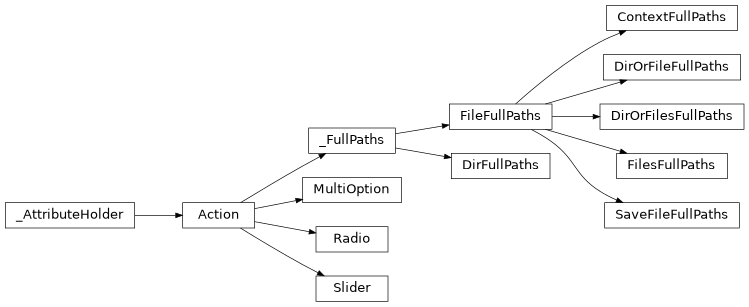
Class Inheritance Diagram
lib.cli.args_extract_convert Module
The Command Line Argument options for extracting and converting with faceswap.py
- class lib.cli.args_extract_convert.ConvertArgs(subparser: _SubParsersAction | None, command: str, description: str = 'default')
Creates the command line arguments for conversion.
This class inherits base options from
ExtractConvertArgswhere arguments that are used for both Extract and Convert should be placed.Commands explicit to Convert should be added in
get_optional_arguments()- Parameters:
subparser (_SubParsersAction | None)
command (str)
description (str)
- static get_info() str
The information text for the Convert command.
- Returns:
The information text for the Convert command.
- Return type:
str
- static get_optional_arguments() list[dict[str, Any]]
Returns the argument list unique to the Convert command.
- Returns:
The list of optional command line options for the Convert command
- Return type:
list
- class lib.cli.args_extract_convert.ExtractArgs(subparser: _SubParsersAction | None, command: str, description: str = 'default')
Creates the command line arguments for extraction.
This class inherits base options from
ExtractConvertArgswhere arguments that are used for both Extract and Convert should be placed.Commands explicit to Extract should be added in
get_optional_arguments()- Parameters:
subparser (_SubParsersAction | None)
command (str)
description (str)
- static get_info() str
The information text for the Extract command.
- Returns:
The information text for the Extract command.
- Return type:
str
- static get_optional_arguments() list[dict[str, Any]]
Returns the argument list unique to the Extract command.
- Returns:
The list of optional command line options for the Extract command
- Return type:
list
- class lib.cli.args_extract_convert.ExtractConvertArgs(subparser: _SubParsersAction | None, command: str, description: str = 'default')
Parent class to capture arguments that will be used in both extract and convert processes.
Extract and Convert share a fair amount of arguments, so arguments that can be used in both of these processes should be placed here.
No further processing is done in this class (this is handled by the children), this just captures the shared arguments.
- Parameters:
subparser (_SubParsersAction | None)
command (str)
description (str)
- static get_argument_list() list[dict[str, Any]]
Returns the argument list for shared Extract and Convert arguments.
- Returns:
The list of command line options for the given Extract and Convert
- Return type:
list
Classes
|
Creates the command line arguments for conversion. |
|
Creates the command line arguments for extraction. |
|
Parent class to capture arguments that will be used in both extract and convert processes. |
Class Inheritance Diagram

lib.cli.args_train Module
The Command Line Argument options for training with faceswap.py
- class lib.cli.args_train.TrainArgs(subparser: _SubParsersAction | None, command: str, description: str = 'default')
Creates the command line arguments for training.
- Parameters:
subparser (_SubParsersAction | None)
command (str)
description (str)
- static get_argument_list() list[dict[str, Any]]
Returns the argument list for Train arguments.
- Returns:
The list of command line options for training
- Return type:
list
- static get_info() str
The information text for the Train command.
- Returns:
The information text for the Train command.
- Return type:
str
Classes
|
Creates the command line arguments for training. |
Class Inheritance Diagram

lib.cli.args Module
The global and GUI Command Line Argument options for faceswap.py
- class lib.cli.args.FaceSwapArgs(subparser: _SubParsersAction | None, command: str, description: str = 'default')
Faceswap argument parser functions that are universal to all commands.
This is the parent class to all subsequent argparsers which holds global arguments that pertain to all commands.
Process the incoming command line arguments, validates then launches the relevant faceswap script with the given arguments.
- Parameters:
subparser (
argparse._SubParsersAction| None) – The subparser for the given command.Noneif the class is being called for reading rather than processingcommand (str) – The faceswap command that is to be executed
description (str, optional) – The description for the given command. Default: “default”
- static get_argument_list() list[dict[str, Any]]
Returns the argument list for the current command.
The argument list should be a list of dictionaries pertaining to each option for a command. This function should be overridden with the actual argument list for each command’s argument list.
See existing parsers for examples.
- Returns:
The list of command line options for the given command
- Return type:
list
- static get_info() str
Returns the information text for the current command.
This function should be overridden with the actual command help text for each commands’ parser.
- Returns:
The information text for this command.
- Return type:
str
- static get_optional_arguments() list[dict[str, Any]]
Returns the optional argument list for the current command.
The optional arguments list is not always required, but is used when there are shared options between multiple commands (e.g. convert and extract). Only override if required.
- Returns:
The list of optional command line options for the given command
- Return type:
list
- class lib.cli.args.FullHelpArgumentParser(prog=None, usage=None, description=None, epilog=None, parents=[], formatter_class=<class 'argparse.HelpFormatter'>, prefix_chars='-', fromfile_prefix_chars=None, argument_default=None, conflict_handler='error', add_help=True, allow_abbrev=True, exit_on_error=True)
Extends
argparse.ArgumentParserto output full help on bad arguments.- error(message: string)
Prints a usage message incorporating the message to stderr and exits.
If you override this in a subclass, it should not return – it should either exit or raise an exception.
- Parameters:
message (str)
- Return type:
NoReturn
- class lib.cli.args.GuiArgs(subparser: _SubParsersAction | None, command: str, description: str = 'default')
Creates the command line arguments for the GUI.
- Parameters:
subparser (_SubParsersAction | None)
command (str)
description (str)
- static get_argument_list() list[dict[str, Any]]
Returns the argument list for GUI arguments.
- Returns:
The list of command line options for the GUI
- Return type:
list
- class lib.cli.args.SmartFormatter(prog: str, indent_increment: int = 2, max_help_position: int = 24, width: int | None = None)
Extends the class
argparse.HelpFormatterto allow custom formatting in help text.Adapted from: https://stackoverflow.com/questions/3853722
Notes
Prefix help text with “R|” to override default formatting and use explicitly defined formatting within the help text. Prefixing a new line within the help text with “L|” will turn that line into a list item in both the cli help text and the GUI.
- Parameters:
prog (str)
indent_increment (int)
max_help_position (int)
width (int | None)
Classes
|
Faceswap argument parser functions that are universal to all commands. |
|
Extends |
|
Creates the command line arguments for the GUI. |
|
Extends the class |
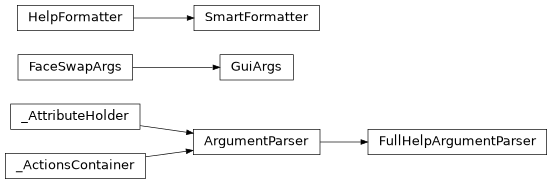
Class Inheritance Diagram
lib.cli.launcher Module
Launches the correct script with the given Command Line Arguments
- class lib.cli.launcher.ScriptExecutor(command: str)
Loads the relevant script modules and executes the script.
This class is initialized in each of the arg parsers for the relevant command, then execute script is called within their set_default function.
- Parameters:
command (str) – The faceswap command that is being executed
- execute_script(arguments: argparse.Namespace) None
Performs final set up and launches the requested
_commandwith the given command line arguments.Monitors for errors and attempts to shut down the process cleanly on exit.
- Parameters:
arguments (argparse.Namespace) – The command line arguments to be passed to the executing script.
- Return type:
None
Classes
|
Loads the relevant script modules and executes the script. |